1,000+ Templates · Otto AI · One Platform

Built by compliance professionals.
So you don’t have to be one.

Regulatory-anchored features with the expertise built in, with ICA and CISI certified compliance practitioners beside you — step-by-step guidance on every screen, 1,000+ ready-made templates, and Otto, your AI compliance analyst, one question away. Three plans: Starter, Pro and Network+. For FCA-regulated firms that need supervisory-grade evidence — fast.

Create free account Book a demo

14-day free trial, no card needed · Take the tour

ICA & CISI Certified Compliance Practitioners
25+ Years Experience
Bank-Grade Encryption
SOC 2 Infrastructure
ISO 27001 Infrastructure
UK & EU Hosted
ICO Registered
Platform Features

Every feature, plus Otto. See inside every one.

Every feature maps to its FCA sourcebook, comes with expert templates and is wired into Otto for live MI and board-ready reports. Pick a feature — the live screen first, the full detail beneath it. Click any screenshot to enlarge: this is the live product, not a mock-up.
1,139
Expert Templates
72
Categories
7
Regulators Mapped
12,000+
Handbook Provisions
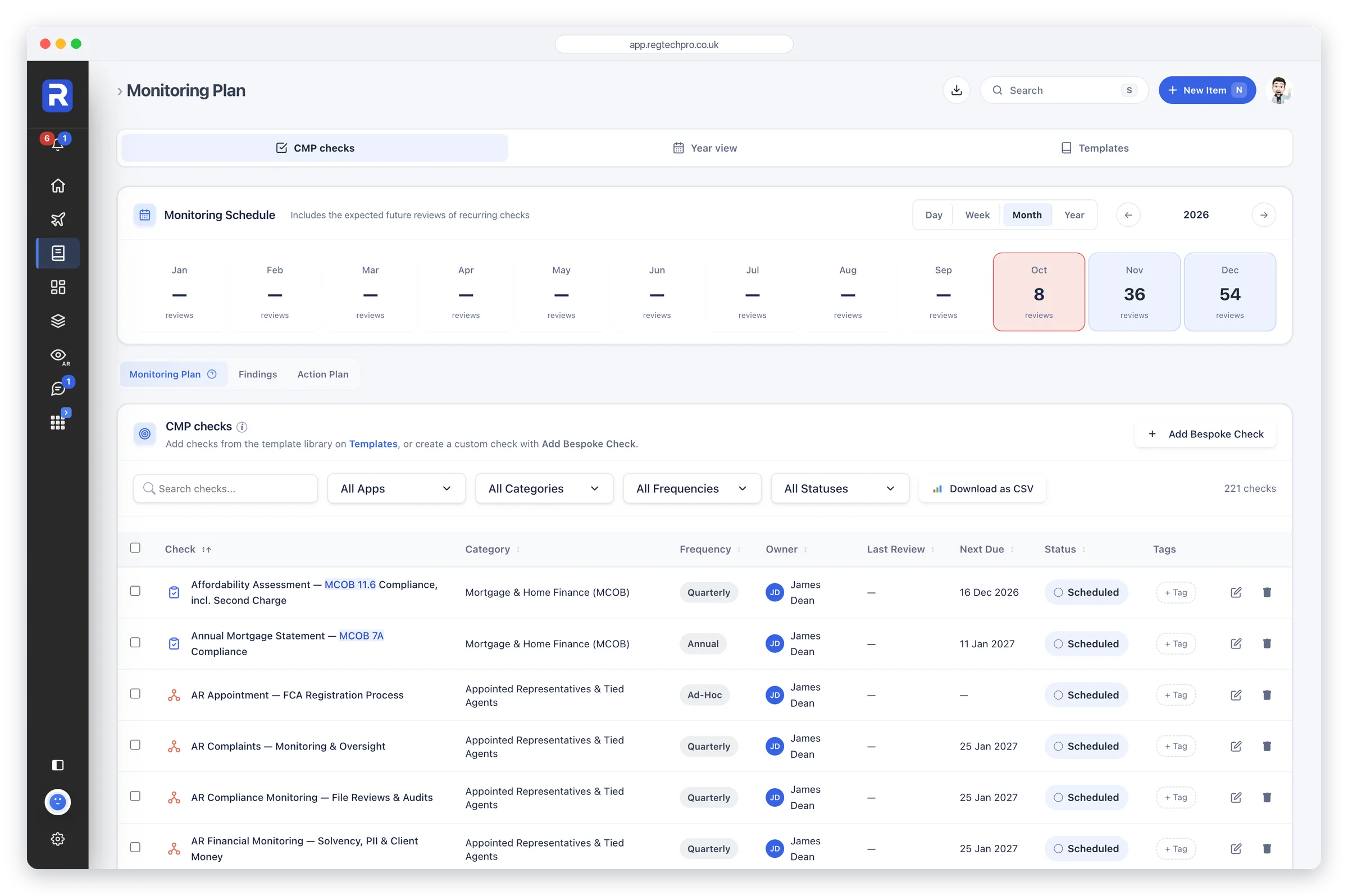
The Monitoring Plan: a month-by-month schedule above the list of CMP checks with category, frequency, owner, next due and status

Monitoring Plan, FCA Reporting and Core Registers

Your whole compliance monitoring programme in one place

The Monitoring Plan runs the firm's entire compliance monitoring programme from one surface: 1,139 expert-built templates across 72 categories spanning seven regulators, from which the firm adds the checks it needs, and every rule a check cites opens its current wording from the FCA Handbook. FCA Reporting holds each return the firm files, with its owner and due dates, and Core Registers is a unified register for confirmations, breaches, complaints, conflicts and custom forms. Reports builds a 12-section Compliance Monitoring Report from the plan's live data, with Otto writing the commentary. It’s where the Compliance Officer runs the monitoring plan day to day.

Who it’s forCompliance Officers and SMF16 holders running a SYSC 6.1 monitoring programme, and consultants switching between several client firms from one login.
What it does

  • 1,139 templates, 72 categories, 7 regulators
  • Unified register: confirmations, breaches, complaints, conflicts, gifts
  • Rule references on every check open their live FCA Handbook wording
  • A schedule and a year view of every check, month by month
  • Form Builder with 14 field types for custom forms
  • Switch between client firms from one login

What it produces

  • 12-section Compliance Monitoring Report, built in Reports
  • Report exports to Word and PDF
  • Live registers: complaints (DISP), breaches (SUP 15.3), conflicts, G&E
  • CSV export of any register
Regulatory coverage
SYSC 6.1SYSC 6.2PRIN 2ADISPSUP 15.3MLR 2017UK GDPR
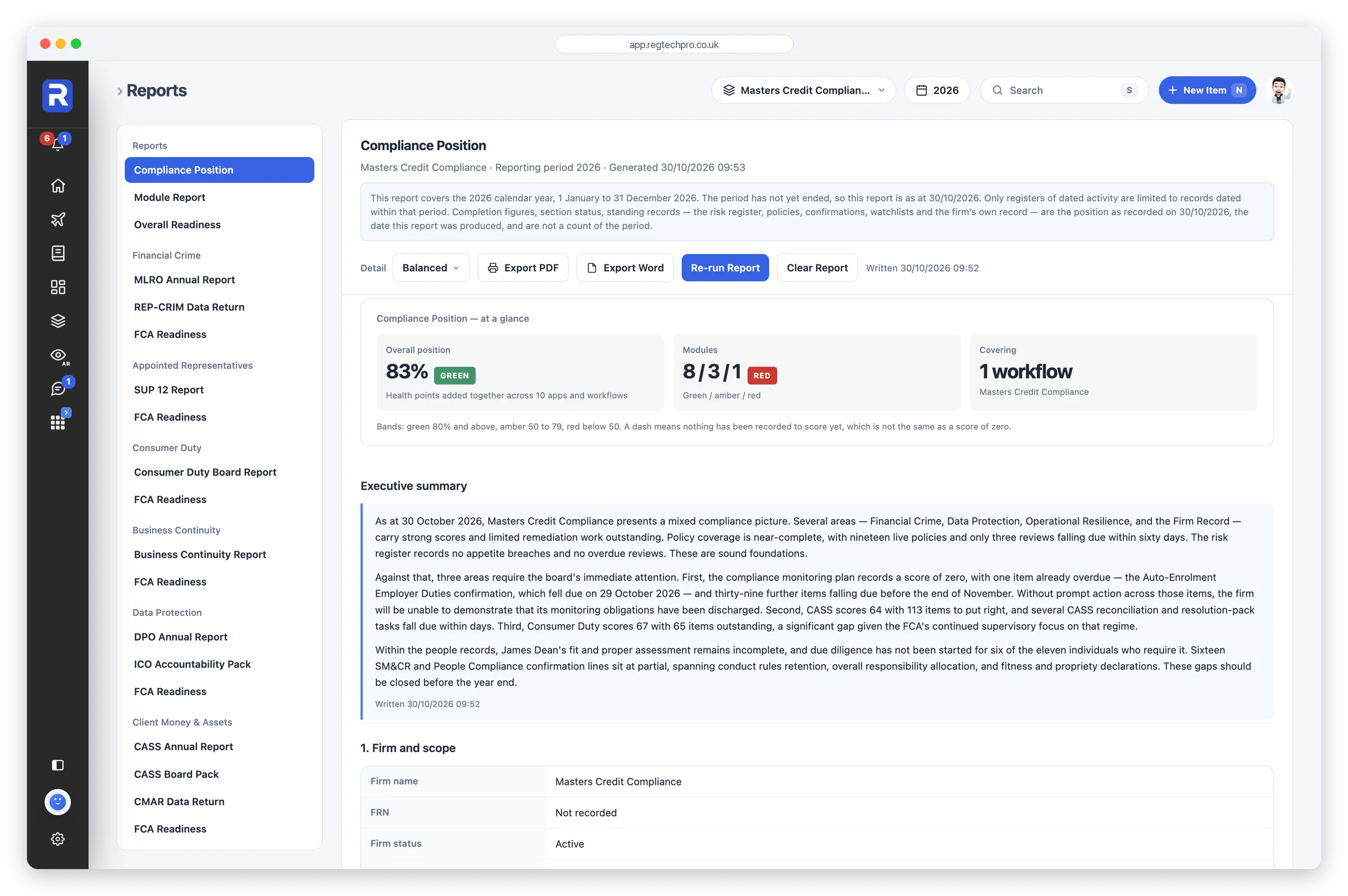
Reports: the catalogue of regulatory reports on the left, and a generated Compliance Position report on the right

Reports

Every regulatory report the firm needs, built from the records already entered

Reports holds every regulatory report the firm needs, built from the records already entered: the Compliance Position, an Overall Readiness view, the MLRO annual report and REP-CRIM return, the SUP 12 report, the Consumer Duty board report, the DPO annual report and ICO accountability pack, the CASS annual report and CMAR, the Risk Committee report, the Compliance Monitoring report, and an FCA Readiness report for each area. Each report is put together from the live records when it’s opened. Otto writes the executive summary, a commentary on each section and the conclusion when asked, and any section left unwritten is named on screen and in the export.

Who it’s forCompliance Officers, MLROs, data protection officers and boards who need a report drawn from the firm’s own records.
What it does

  • Builds each report from the records already entered, when it’s opened
  • Otto writes the executive summary, each section’s commentary and the conclusion
  • Covers the workflows you choose, one or several
  • A start and end date for the reports that cover a period
  • Names any section left unwritten, on screen and in the export
  • Exports to PDF and Word

What it produces

  • Compliance Position and Overall Readiness
  • MLRO Annual Report and REP-CRIM Data Return
  • Consumer Duty Board Report
  • DPO Annual Report and ICO Accountability Pack
  • CASS Annual Report, CASS Board Pack and CMAR Data Return
  • An FCA Readiness report for each area
Regulatory coverage
SYSC 6.3PRIN 2ASUP 12CASSUK GDPR
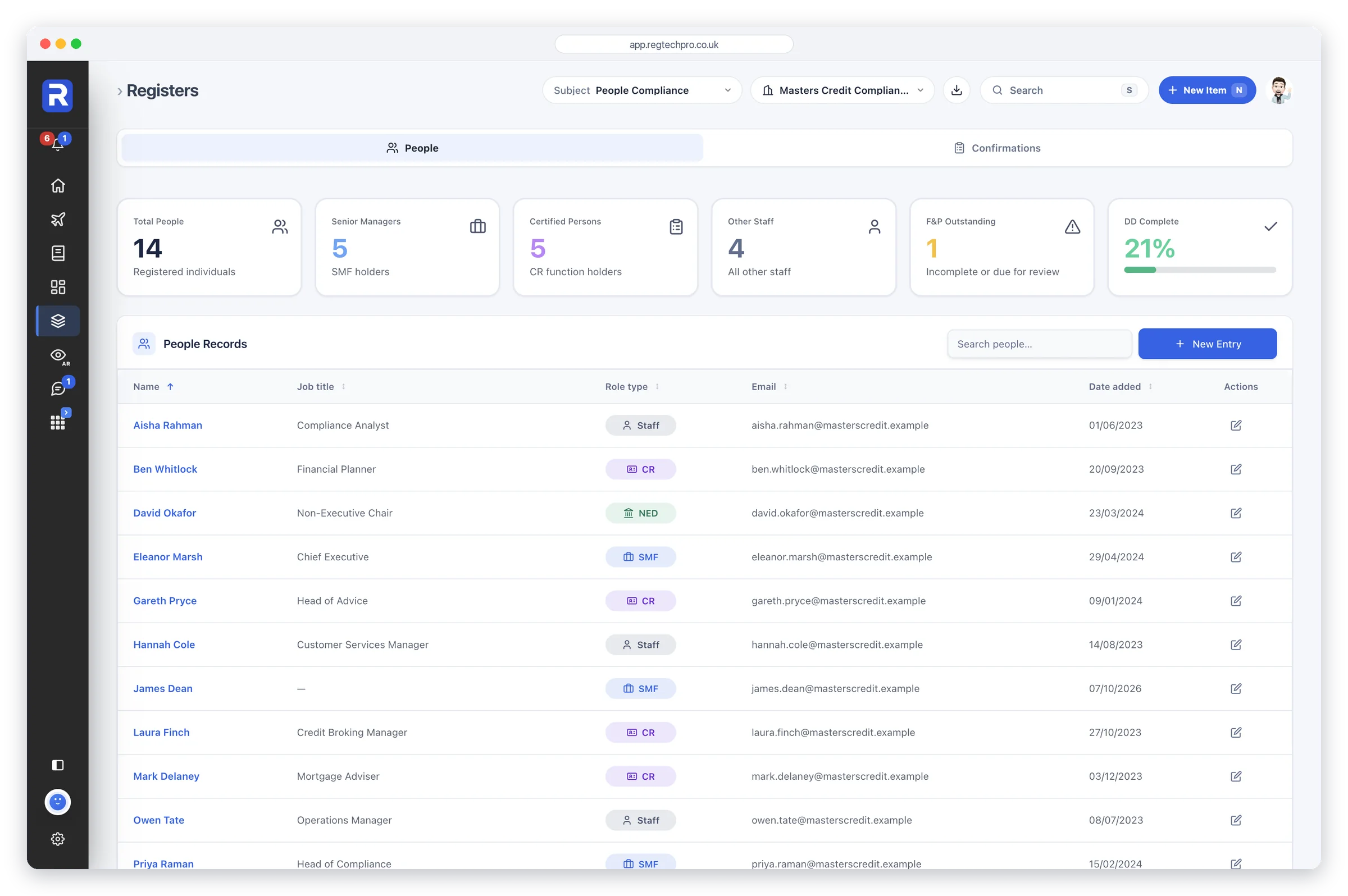
The People Compliance register: total people, senior managers, certified persons, other staff, fit and proper reviews outstanding and due diligence completion, above the list of people records with job title and role type

People Compliance

Every regulated individual, evidenced and certified

The SM&CR, APER and IDD operating system: a register of regulated individuals where each record opens a regime-aware editor covering the SMF Statement of Responsibilities, the FCA Form A Section 5 fit-and-proper assessment, annual certification, due diligence and CPD. It models who does the regulated work, and applies to every authorised firm — SM&CR has had no proportionality exemption since December 2019.

Who it’s forThe SMF16, Head of Compliance or HR-compliance lead at any FCA-authorised firm — universal, since every firm has at least one Senior Manager and certified staff.
What it does

  • Six regime-native record types across SM&CR
  • 57-question FCA Form A fit-and-proper with RAG summary
  • Statement of Responsibilities: 31 Prescribed Responsibilities
  • 8 Certification Functions mapped to SYSC 27.8
  • CPD tracked against each person’s annual target
  • 9-document due-diligence onboarding checklist
  • PA dealing accounts and annual declaration per person
  • IRN look-up on the FCA Register: roles, disciplinary history, past firms

What it produces

  • Certificate of Competence PDF, 12-month validity, per certified person
  • FCA Form A Section 5 fit-and-proper assessment record
  • Statement of Responsibilities record for each SMF and NED
  • Every people register as CSV, in one ZIP download
  • F&P renewal reminders in the bell and on the Flight Deck
Regulatory coverage
SUP 10CCOCONFIT 1.3SYSC 27Form A s.5APERIDD
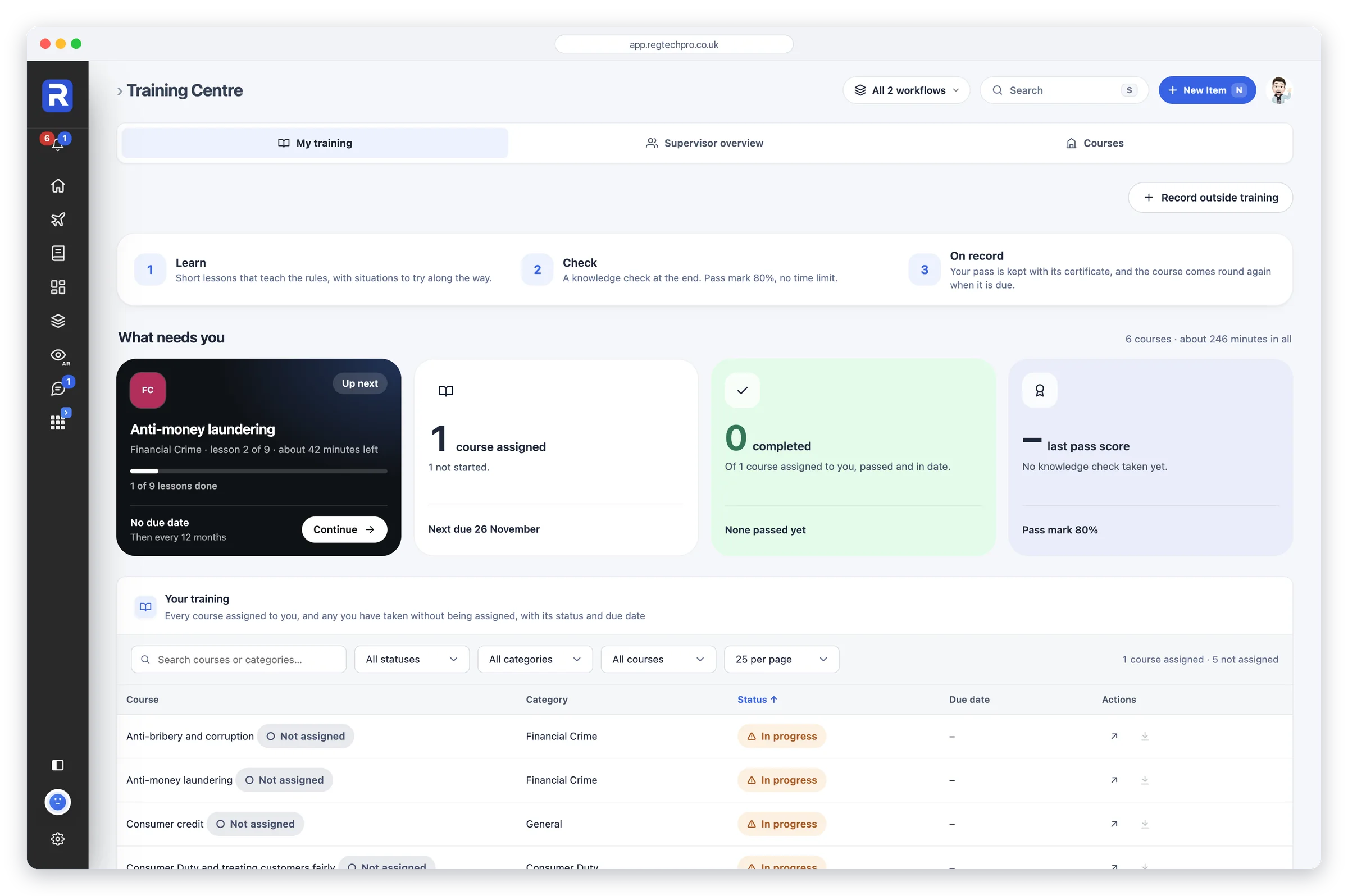
The Training Centre: a person's own training, with the course to continue, courses assigned and pass marks

Training Centre

Courses that teach your team the rules, and the training record the FCA asks to see

The Training Centre holds more than 25 courses that teach your team the rules and the law behind them, from anti-money laundering and sanctions to the Conduct Rules, Consumer Duty and customers in vulnerable circumstances, with versions for each kind of firm. Each course has short lessons with exercises through them and a knowledge check with a pass mark of 80%. Every course, attempt, score, date and certificate is kept person by person, with classroom sessions, webinars and training done elsewhere recorded beside it, so the firm’s training record is ready when the FCA asks to see it.

Who it’s forEvery member of the team, who takes the courses given to them and sees their own training; and administrators and approvers, who see who is due, who is overdue and where understanding is weakest.
What it does

  • Courses with lessons, exercises and a knowledge check
  • Versions of each course for each kind of firm
  • Assign courses with a due date, due again every 12 months or on your own cycle
  • Record classroom sessions and webinars, with who attended
  • See the whole team: who is due, who is overdue and where understanding is weakest

What it produces

  • A PDF certificate for every pass
  • The training record for each person
  • Results for each knowledge check, question by question
Regulatory coverage
TCSYSC 5COCONPRIN 2AMLR 2017 Reg 24
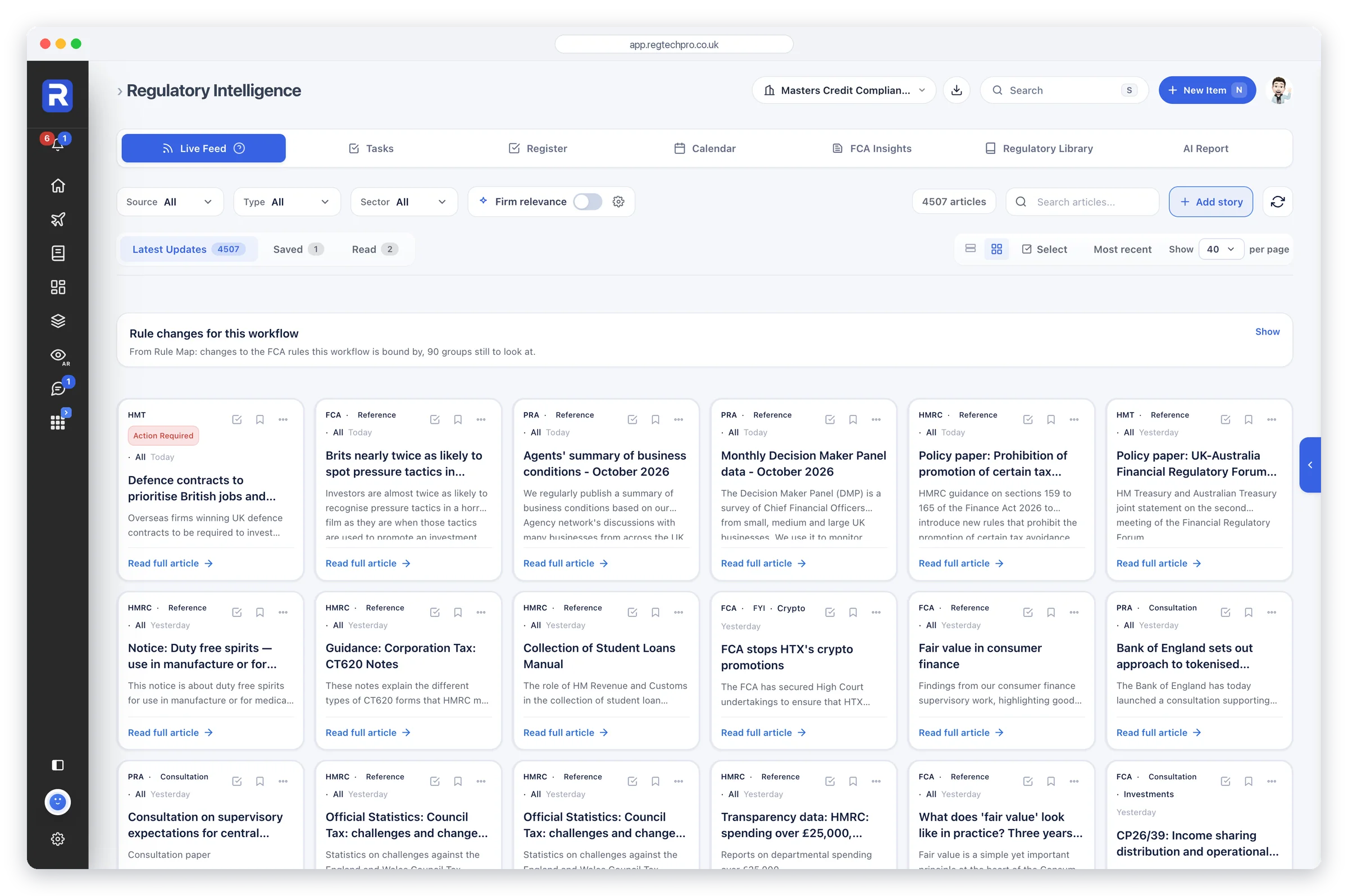
The Regulatory Intelligence live feed: publications from HM Treasury, the FCA, PRA, HMRC and others, filtered by source, type and sector, with firm relevance and saved and read views

Regulatory Intelligence

Thirteen UK regulators, filtered to your firm

Regulatory Intelligence unifies 13 UK regulators — FCA, PRA, ICO, OFSI and nine more — into a single feed refreshed hourly, holding more than 4,500 live articles pre-classified by source, type and sector. Otto's firm-relevance filter narrows the feed to what affects your permissions and products, you assess each item in a regulatory change register with a full audit trail, and Otto drafts a board-ready report exported to Word or PDF.

Who it’s forFor UK FCA-regulated SME firms — compliance officers, MLROs and Heads of Compliance who need to track multiple regulators and evidence regulatory awareness.
What it does

  • One hourly feed across 13 UK regulators
  • Otto AI firm-relevance filter, keyword-transparent and editable
  • Source, Type and Sector filters (8 FCA taxonomies)
  • Regulatory change register with full audit trail
  • Task register plus 30-day deadline calendar
  • Otto plain-English summaries of any update
  • Saved and Read lists shared across the workflow

What it produces

  • Otto board-ready report — saved items, change register, tasks or combined pack — to Word or PDF
  • Regulatory change register with relevance, impact, owner and action logged
  • Otto plain-English update summaries (what it is, what it means, suggested actions)
  • Task register with owners, frequencies and due dates
  • Deadline calendar of consultation closes, go-live dates and reporting windows
Regulatory coverage
FCAPRAICOOFSIHMRCCOBSMCOBCONC
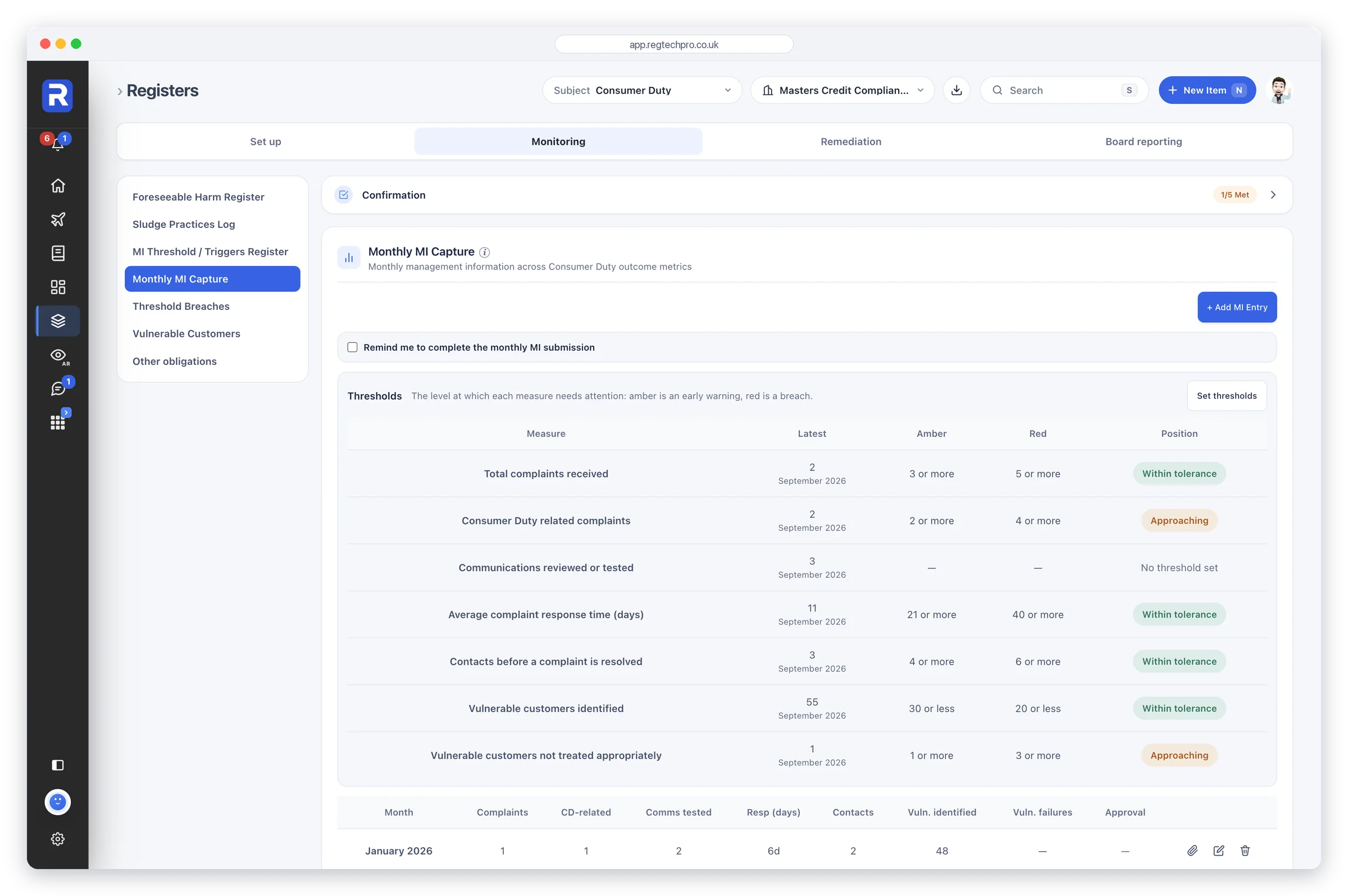
The Consumer Duty app on Registers: Monthly MI Capture, with each measure's latest figure against its amber and red levels and the month-by-month table, beside the other Monitoring sections

Consumer Duty

You confirm, Otto drafts, your board signs

A complete operating layer for FCA Consumer Duty covering all four outcomes, the three cross-cutting rules and vulnerable-customer obligations. Humans record and confirm the work, in registers that each carry a short confirmation, on-page checklists for vulnerable customers and the Duty’s other obligations, and a fair value review on each product’s own record. Reports builds the 13-section Annual Board Report from that live record, with Otto writing the commentary — the split of human input and sign-off the FCA expects to see. Every assertion in the report traces back to a confirmation, a register entry or a logged event.

Who it’s forThe roughly 80% of FCA-regulated firms with retail customers — retail banks, IFAs, wealth managers, consumer credit firms, insurance intermediaries and mortgage brokers subject to PRIN 2A.
What it does

  • What the FCA wants: each expectation beside its evidence
  • A fair value review on each product’s own record
  • Every confirmation named, dated and owned
  • Documents attached to the register entry they support
  • Board Challenge Record: challenge, response, status
  • Vulnerable customers and other obligations checklists
  • Consumer Duty monitoring checks in the firm’s Monitoring Plan

What it produces

  • 13-section PRIN 2A.8 Annual Board Report in Reports (PDF + Word)
  • Per-product fair value assessments
  • Board Challenge Record — dated, named log
Regulatory coverage
Principle 12PRIN 2APS22/9FG22/5FG21/1PRODDISPSM&CR
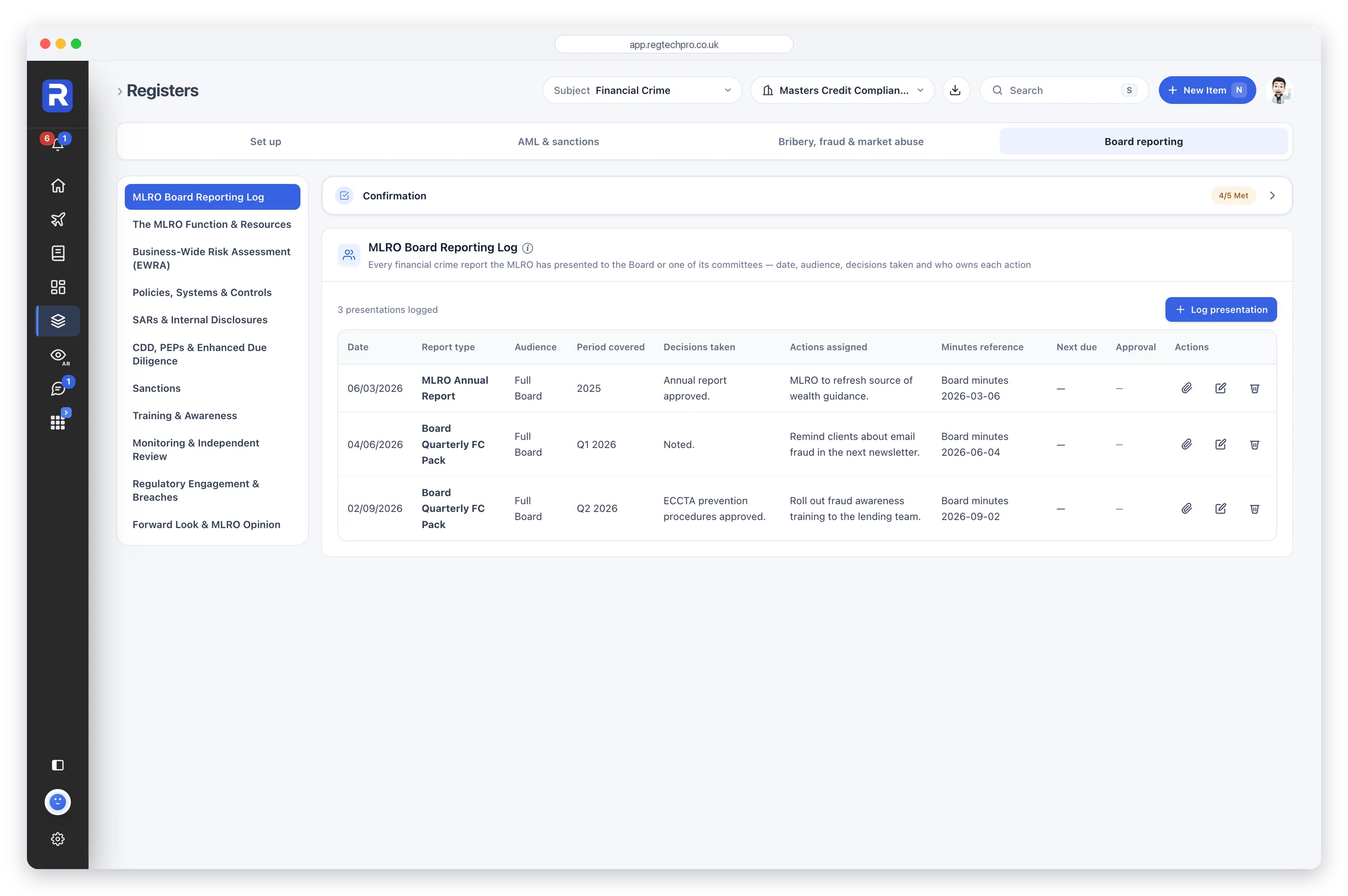
The Financial Crime app on Registers: the MLRO Board Reporting Log, with each presentation's date, audience, decisions and actions, and the ten MLRO registers listed beside it

Financial Crime

The MLRO's financial-crime operating system

Financial Crime is a complete MLRO workflow that turns every FCA and statutory financial-crime obligation into structured data capture, registers, evidence and Otto-drafted regulatory reports. It spans eight regimes — AML, transaction monitoring, sanctions, anti-bribery, SAR/STOR, market abuse, tax evasion and fraud — with customer due diligence in the Customer Hub, and one Financial Crime Health score. It replaces the MLRO's spreadsheet stack and much of an outsourced AML consultant.

Who it’s forFor the MLRO or Nominated Officer at an FCA-regulated firm running and evidencing a full financial-crime programme.
What it does

  • One Financial Crime Health score across confirmations, checks and registers
  • MLRO annual report built from ten MLRO registers, one per chapter
  • What the FCA wants, and a short confirmation above every register
  • Financial-crime risk assessments register
  • Live registers: SARs, sanctions, TM alerts, fraud, market abuse
  • Restricted and watch list register
  • Anti-bribery programme checked against the six MoJ principles

What it produces

  • MLRO Annual Report in Reports, from the MLRO’s own record
  • FCA Readiness report: a mock FCA interview, RAG-graded
  • FCA REP-CRIM data return
  • Every register as CSV, one folder per workflow
Regulatory coverage
MLR 2017POCA 2002SAMLA 2018Bribery Act 2010CFA 2017UK MARJMLSGSYSC 6.3
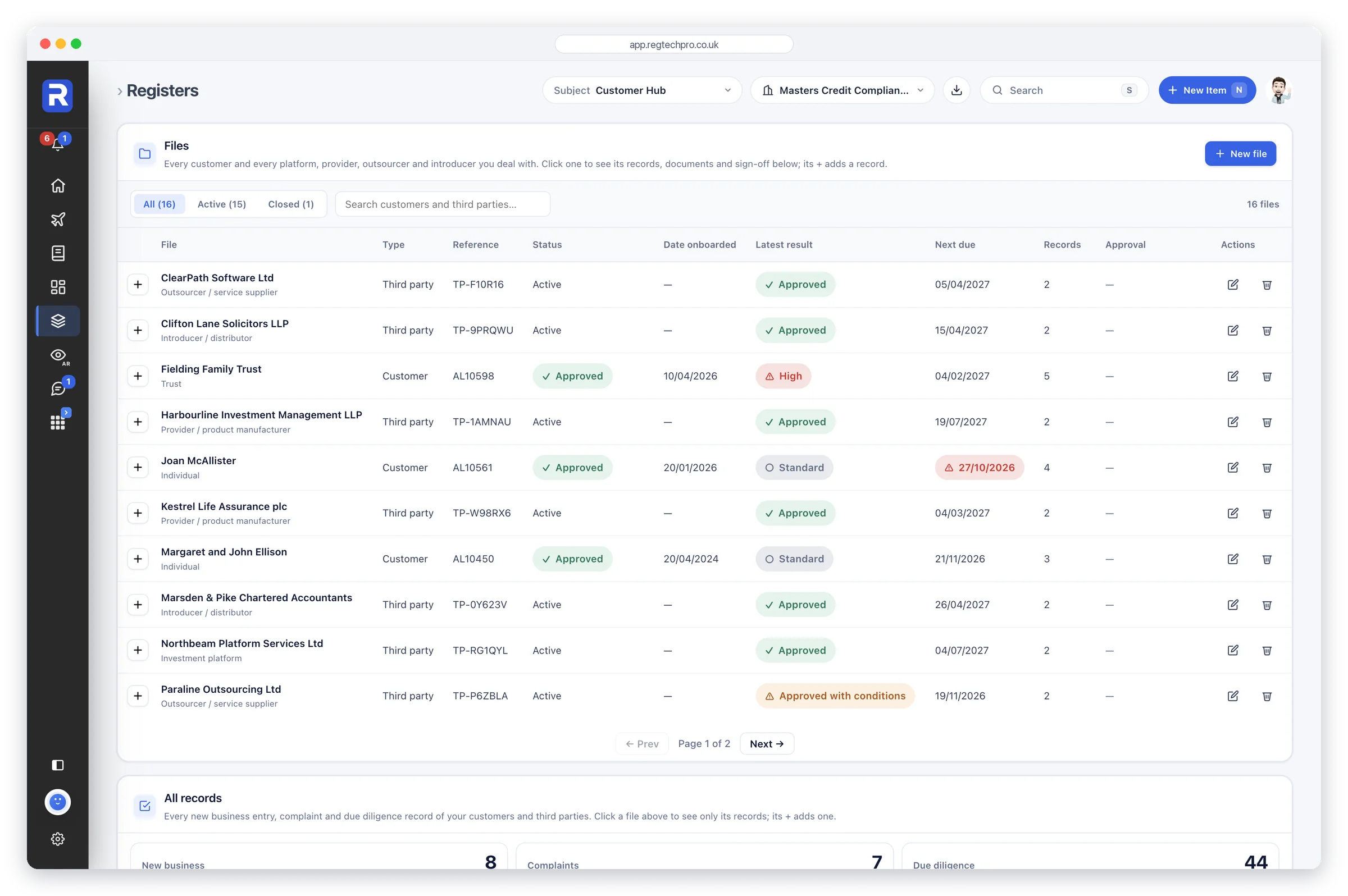
The Customer Hub: customers and third parties on file, with their reference, status, latest result and next review

Customer Hub

Every customer and third party, and everything recorded about them, in one place

One page, Files, for your customers and your third parties. Each customer carries its details and, beneath them, every record the firm makes about it over time: its due diligence, its new business and its complaints, each added from the + on the customer’s row, which is what links it to the customer. Due diligence is recorded check by check — customer reviews, beneficial ownership, client categorisation, enhanced due diligence and exits, with screening split into sanctions, adverse media, criminal records and politically exposed persons so each can be run and dated separately. Each third party — an investment platform, a provider of products, an outsourced service, an introducer or distributor — gets the firm assessment for its type and the same separate screening checks. New business and complaints stay on Core Registers as well, where users without the Customer Hub, appointed representatives among them, record them against an existing customer or a new one. A customer’s risk rating, level of due diligence and next review come from its latest customer review, a third party’s next review from its latest assessment, and an overdue review is chased.

Who it’s forFirms that onboard customers or rely on third parties — advisers, brokers, platforms, principal firms whose appointed representatives write business, and any firm with outsourcing, introducer or distribution arrangements to evidence.
What it does

  • One Files page listing the firm’s customers and third parties, with every record made about them
  • A + on each customer to add new business, a complaint or a due diligence record to it
  • Filters for new business, complaints, with how many are open, and due diligence, with how many reviews are overdue
  • Customer due diligence: customer reviews, beneficial ownership, sanctions screening, adverse media, criminal record checks, PEPs, enhanced DD, categorisation and exits
  • Third-party due diligence: platform, provider, outsourcing and introducer assessments, with sanctions, adverse media, criminal record, PEP, ownership and enhanced DD checks
  • Unlimited beneficial owners per customer — no fixed number of slots
  • PEP records with country of exposure, role held, justification and enhanced monitoring
  • New business and complaints recorded in Core Registers too, linked to an existing customer or a new one
  • One next review date per customer and third party, from its latest review or assessment
  • The monitoring checks for due diligence, complaints handling and client onboarding, in the Monitoring Plan

What it produces

  • A file per customer holding its details, due diligence, new business and complaints in date order
  • A beneficial-ownership record that stands up to the follow-up questions
  • PEP records carrying the justification and the approval, not just the flag
  • Due Diligence Review report in Reports, with Otto commentary
Regulatory coverage
MLR 2017JMLSGPOCA 2002COBS 3DISP 1SYSC 8FCA Financial Crime Guide
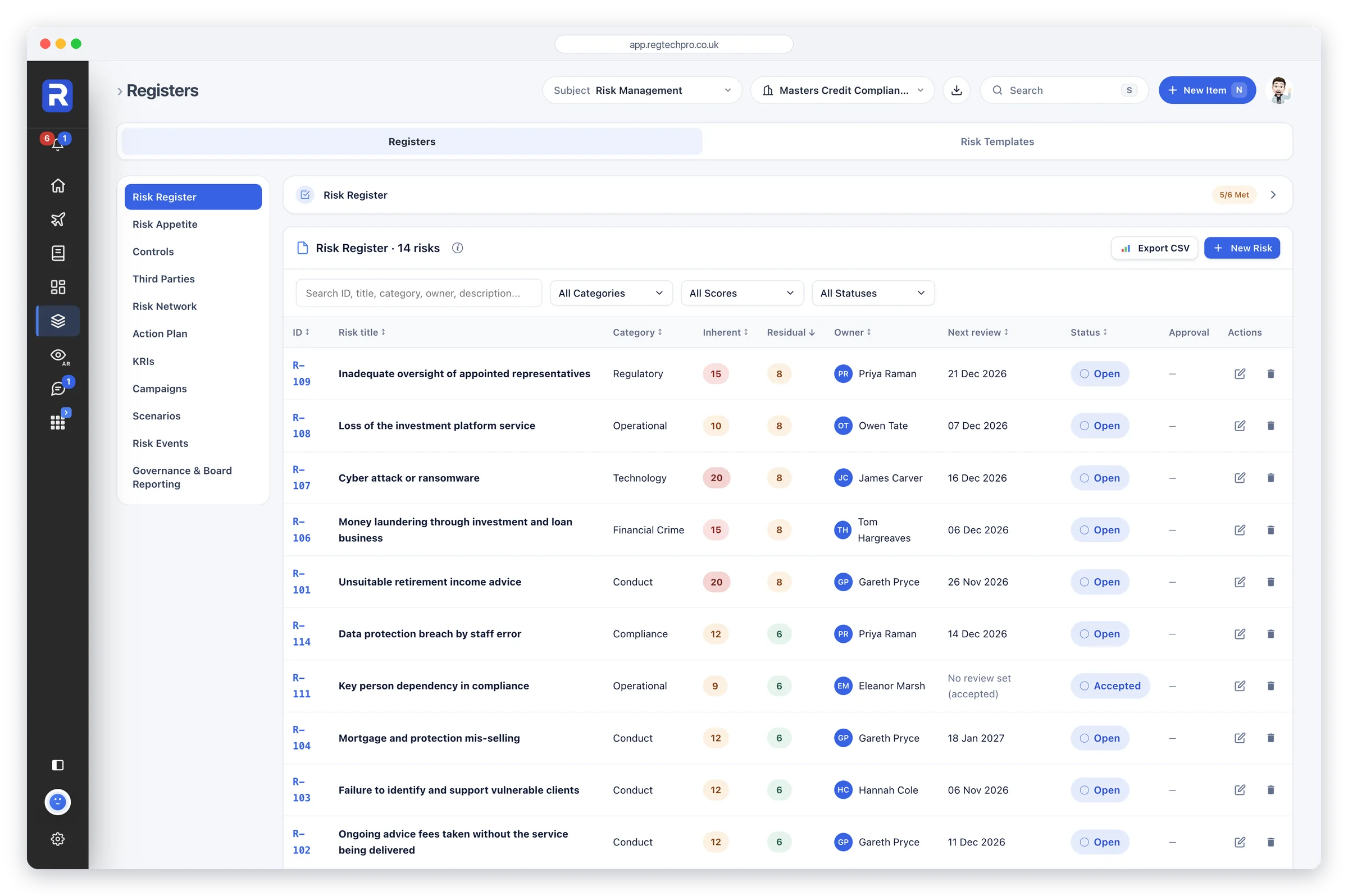
Risk Management: the risk register, with each risk's inherent and residual score, owner, next review and status

Risk Management

Enterprise-grade risk governance at SME pricing

An eleven-register FCA risk governance app built on a 5×5 register that scores inherent, residual and appetite separately, backed by mirrored controls, KRIs, loss events, action plans and stress scenarios. It adds a third-party register aligned to the Critical Third Parties regime, a force-directed risk network with concentration alerts, and RCSA confirmation campaigns that produce signed-off, versioned audit snapshots. Reports builds a 15-section Risk Committee Report from the firm's live data, with Otto writing the commentary.

Who it’s forHeads of Risk, CROs and SMF holders at FCA-regulated firms, plus consultants and principals running multiple client or AR risk registers from one login.
What it does

  • 5×5 register scoring inherent, residual and appetite separately
  • 100 FCA-anchored templates across 8 risk categories
  • Third-party register aligned to SYSC 8, CTP regime
  • Force-directed risk network with concentration alerts
  • RCSA confirmation campaigns with named sign-off
  • Append-only audit trail on every risk change
  • KRIs, loss events, action plans, stress scenarios, switched on when you need them

What it produces

  • 15-section Risk Committee Report in Reports (PDF + Word)
  • Risk Network Board-pack PDF
  • Closed-campaign RCSA audit snapshot PDF
  • Field-level risk audit trail (who changed what, when)
  • CSV exports: register, appetite, controls, third parties
Regulatory coverage
SYSC 7.1SYSC 7.1.4RSYSC 8SYSC 15ACTP regimePRIN 2AMIFIDPRU 7MLR 2017
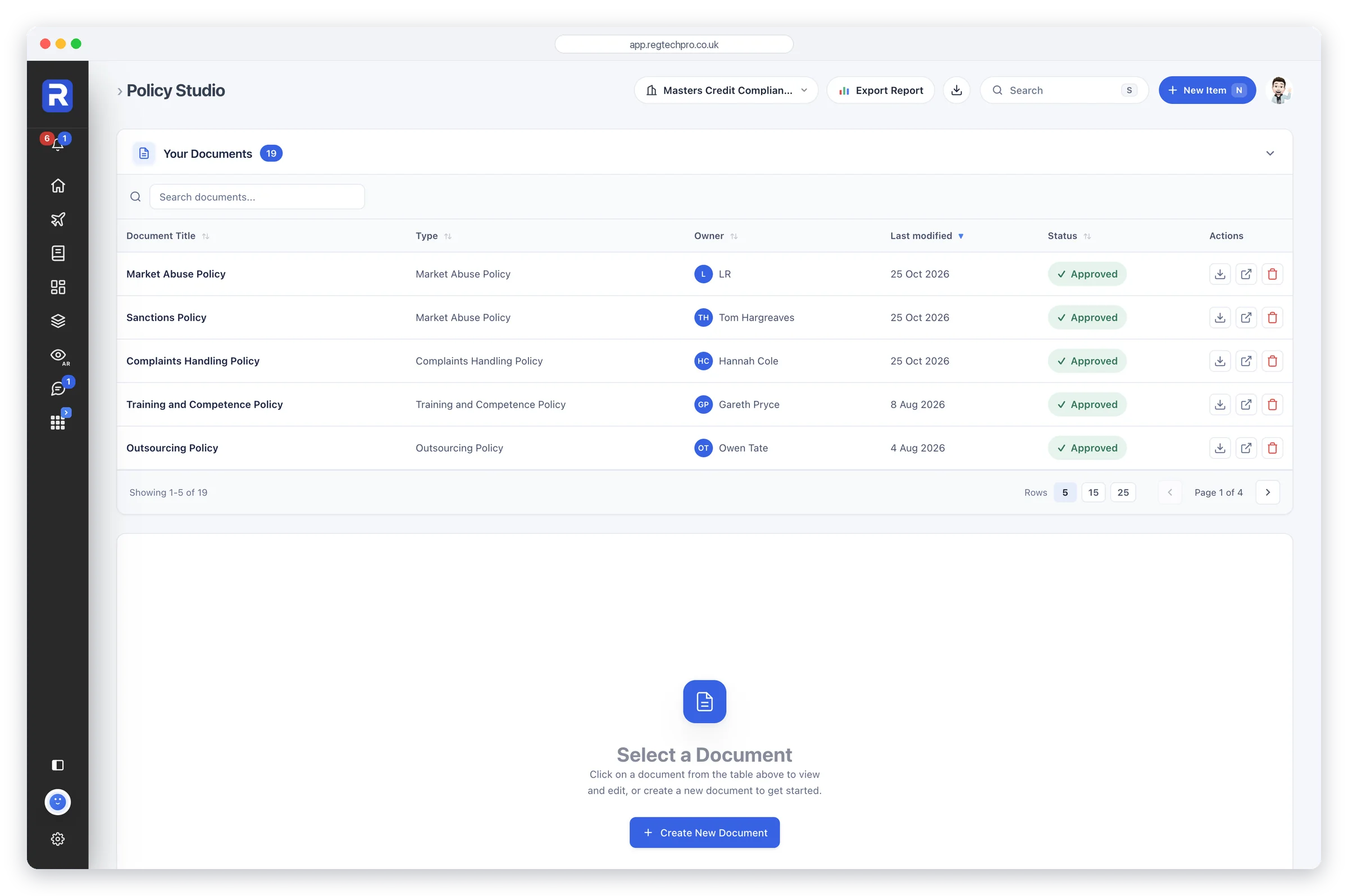
Policy Studio: the firm's documents with their type, owner, last modified date and approval status

Policy Studio

Drafts, reviews and operationalises every policy

A five-stage policy lifecycle that takes a document to FCA-ready evidence: start from a Template Vault document or your own upload, Otto assesses, improves or rewrites it, then turns its key commitments into tracked tasks. Each task quotes the policy wording it came from, so a written obligation ties to an evidenced operation. The finished library exports as a Policy Register PDF for supervisors.

Who it’s forFCA-regulated firms and compliance consultancies that need to draft, maintain, approve and evidence their policy suite without outsourcing to consultants.
What it does

  • Start from any Template Vault policy or your own document
  • Assess & Improve scores each policy out of 10, then adds the fixes
  • Operationalise turns key commitments into tasks, quoting the source wording
  • Accepted tasks flow into the Monitoring Plan with frequency
  • Board approval workflow with full audit trail
  • Upload your own docs; save refined versions as templates

What it produces

  • An FCA-grade policy, assessed and improved by Otto
  • Policy Register PDF (cover, schedule, per-policy control record)
  • Operationalised task list feeding the Monitoring Plan
  • Otto quality score out of 10 with improvement suggestions
Regulatory coverage
PRIN 2AMLR 2017UK GDPRSM&CRCASSCOBSICOBSSYSC
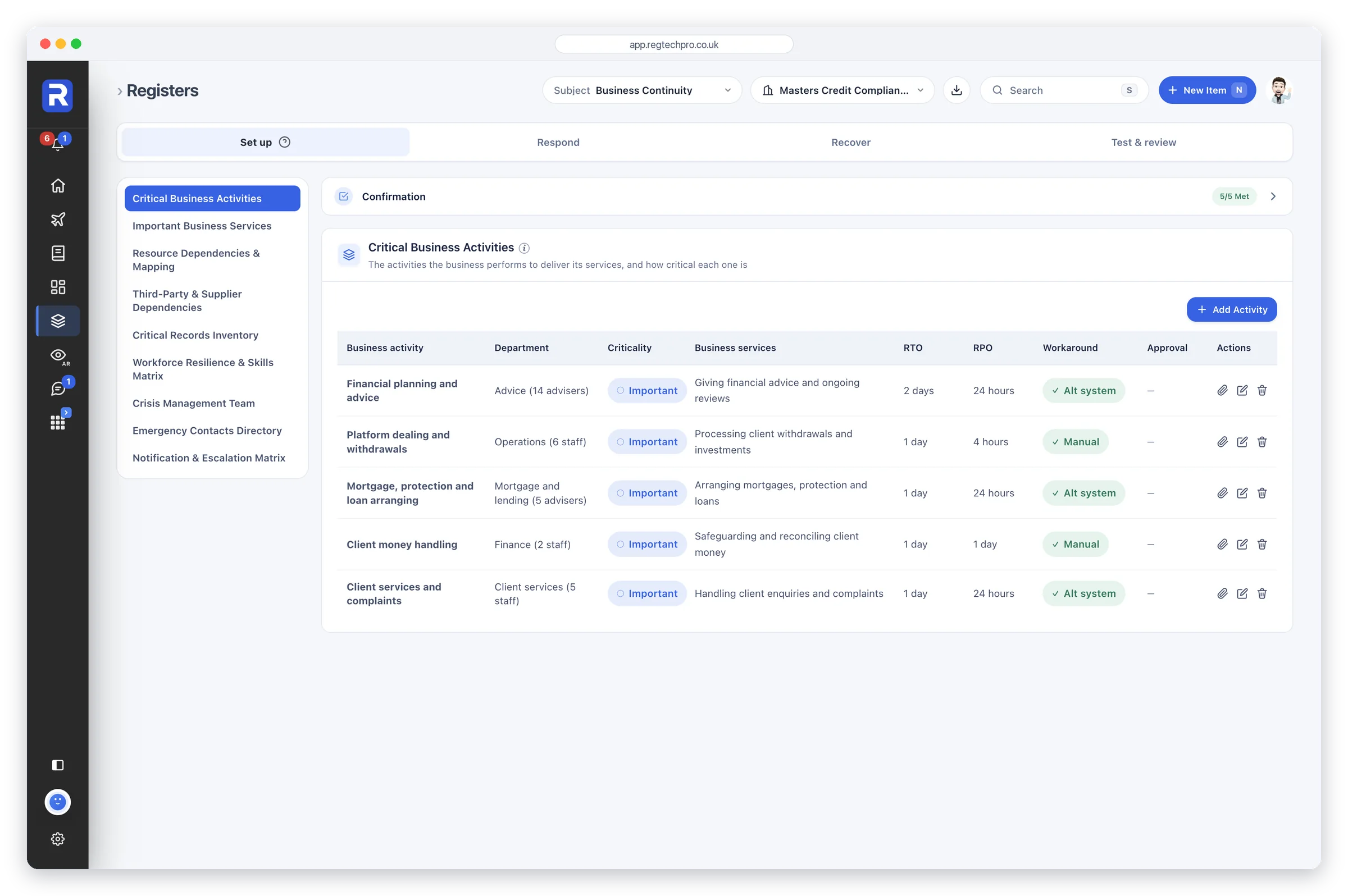
The Business Continuity app on Registers: critical business activities with their criticality, recovery time and recovery point and workaround, and the Set up sections listed beside them

Business Continuity

Business continuity, from planning to live incident

A complete business continuity system for FCA-authorised firms: critical business activities, recovery planning, suppliers and outsourcing, live incident management and board-ready reporting. A Business Continuity Health score counts every confirmation, monitoring check and register entry, so the number shows what is actually done. Live Incidents runs a clock from discovery during a real disruption, with a four-hour report countdown for payment and e-money firms. On the Network+ plan, for the firms SYSC 15A binds, the Operational Resilience sections add important business services, resource dependencies and stress testing, and every closed incident feeds the stress-testing register; any other Network+ firm can switch them on as good practice.

Who it’s forFor COOs, compliance officers and business continuity leads at FCA-authorised firms, with the SYSC 15A operational resilience sections for the firms it binds.
What it does

  • Business Continuity Health score across registers, confirmations and checks
  • What the FCA wants, and a short confirmation above every register
  • Live Incidents: a clock from discovery, four-hour countdown for payment firms
  • 20-step response runbook, 18-item Recovery Box
  • SPOF flags plus a shared-resource concentration map
  • Tabletop exercise programme, 8 pre-loaded scenarios
  • 24 integrated sections, 3 for SYSC 15A, feeding one score

What it produces

  • Business Continuity Report, in Reports
  • FCA Readiness report on the SYSC 15A sections: a mock FCA interview
  • Register data export (CSV ZIP); reports export to PDF and Word
Regulatory coverage
SYSC 4.1SYSC 8.1SYSC 15A.2SYSC 15A.3SYSC 15A.5SYSC 15A.6SYSC 15A.7SYSC 15A.8PS21/3SUP 15.3
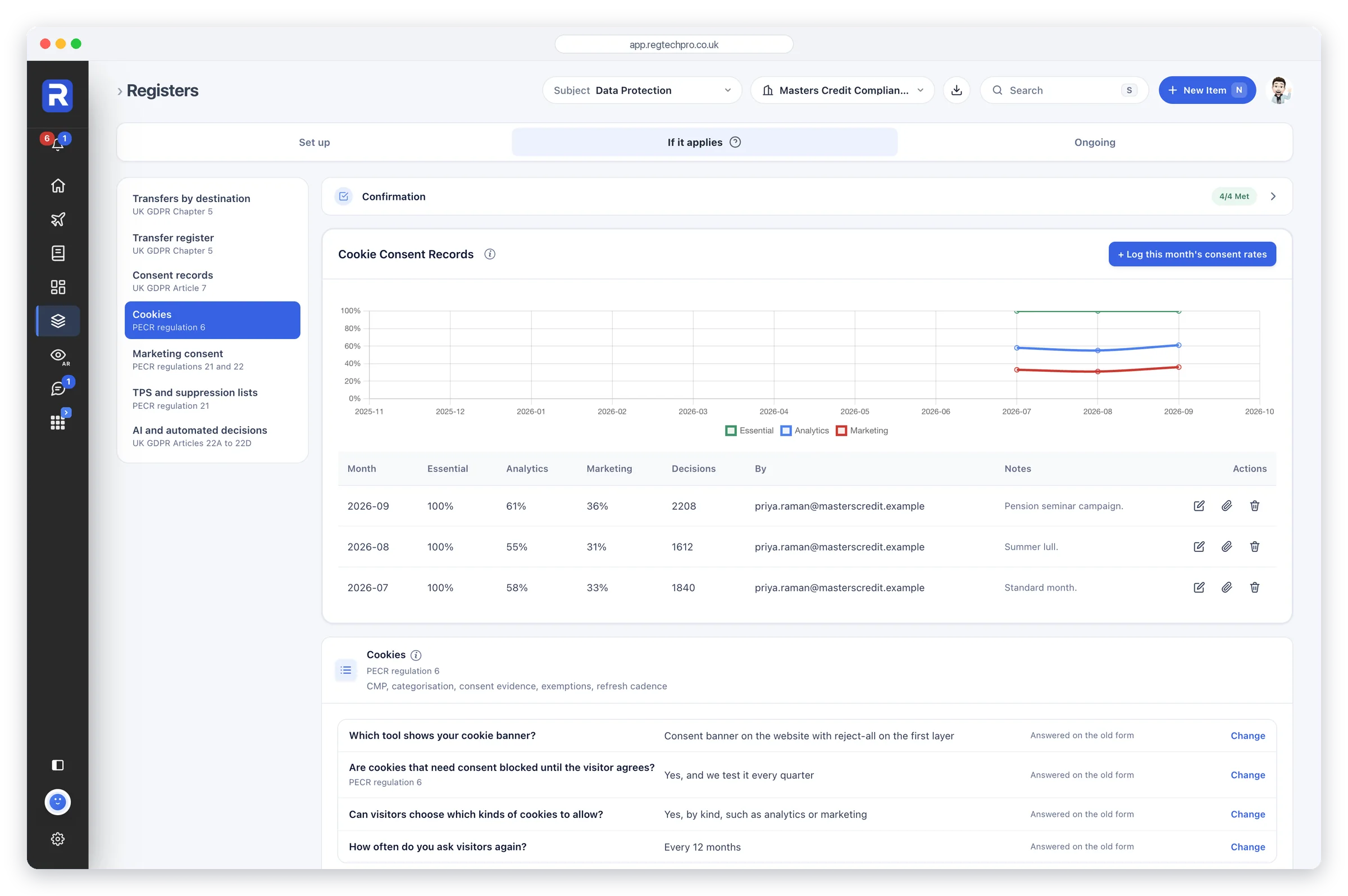
Data Protection: cookie consent records charted month by month, with the cookies register beneath

Data Protection

When the ICO calls, every answer is ready

A UK GDPR, DPA 2018 and PECR operating layer for the data protection officer. It runs the working registers — ROPA, data-subject rights, breaches, DPIAs and international transfers — and gives one Data Protection Health score across its confirmations, monitoring checks and registers. A live 72-hour breach clock and reports in Reports keep the DPO audit-ready.

Who it’s forAny firm processing personal data, run by the DPO or whoever carries data-protection responsibility.
What it does

  • Record of Processing register under Art 30
  • Data-subject rights tracker with deadline auto-escalation
  • Live breach mode with running 72-hour ICO clock
  • DPIAs plus lawful-basis and special-category mapping
  • Transfer register: TIA, SCC, IDTA, approval regulations
  • PECR cookies, consent and marketing-list compliance
  • What the ICO wants, and a short confirmation above every register

What it produces

  • DPO Annual Report (UK GDPR Art 39), in Reports
  • ICO Accountability Pack, in Reports
  • Post-Incident Review (PIR) export
  • Data Protection Health score, RAG-rated
Regulatory coverage
UK GDPRDPA 2018PECRICO AccountabilityUK GDPR Art 30UK GDPR Art 33/34UK GDPR Art 35
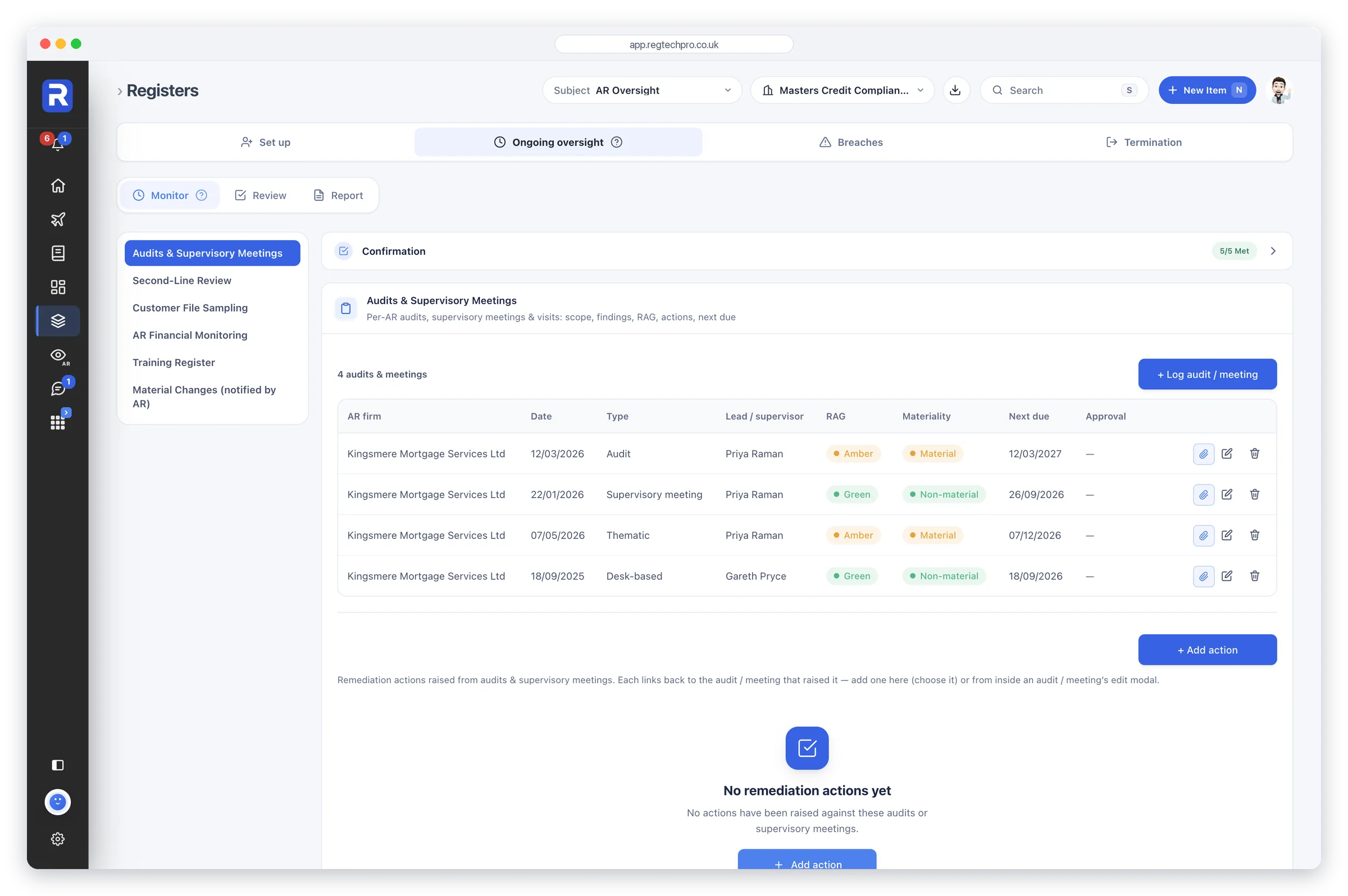
AR Oversight: the audits and supervisory meetings held on an appointed representative, with date, type, lead, rating and next due date

SUP 12 — AR Oversight

The operating system for appointed-representative oversight

A complete operating layer for FCA SUP 12 oversight of appointed representatives, built for the post-Dec 2022 enhanced regime and the 2024 FCA Multi-Firm Review of principal firms. Each AR gets its own onboarding, due-diligence, monitoring and annual-review record, given a health score across registers, confirmations and monitoring checks, and rolled up into a network view. Reports builds a full SUP 12 Report and an FCA Readiness report, a mock FCA interview, from your live records.

Who it’s forFCA-authorised principal firms supervising appointed representatives or IARs — IFA, wealth, mortgage, consumer-credit and insurance intermediary networks — and MiFID investment firms supervising tied agents, each with a Tied Agent tab of its own.
What it does

  • Own onboarding and due-diligence pack per AR
  • 25-item SUP 12 oversight checklist
  • Dated, RAG-rated monitoring visits and second-line audits
  • Intensified monitoring plans for elevated-risk ARs
  • Network pre-issue financial-promotion approval queue
  • Board Sign-Off artefact under SUP 12.6A.6R
  • SUP 15 breach prep pack with FCA field launcher

What it produces

  • SUP 12 Report, built from live records in Reports
  • FCA Readiness mock interview — 12 questions, RAG-graded
Regulatory coverage
SUP 12.4SUP 12.5SUP 12.6ASUP 12.7SUP 12.9SUP 15COBS 4PRIN 2A
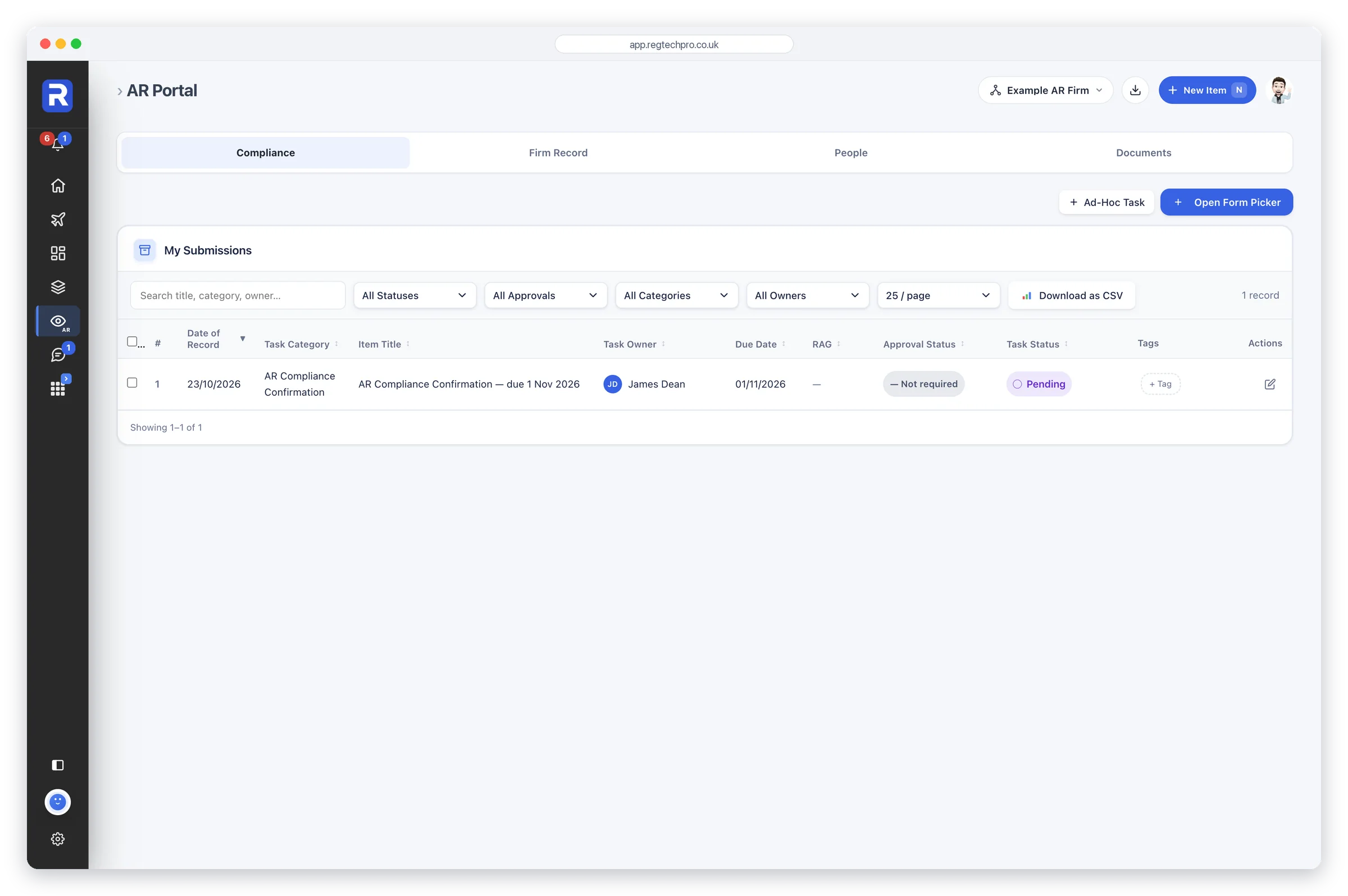
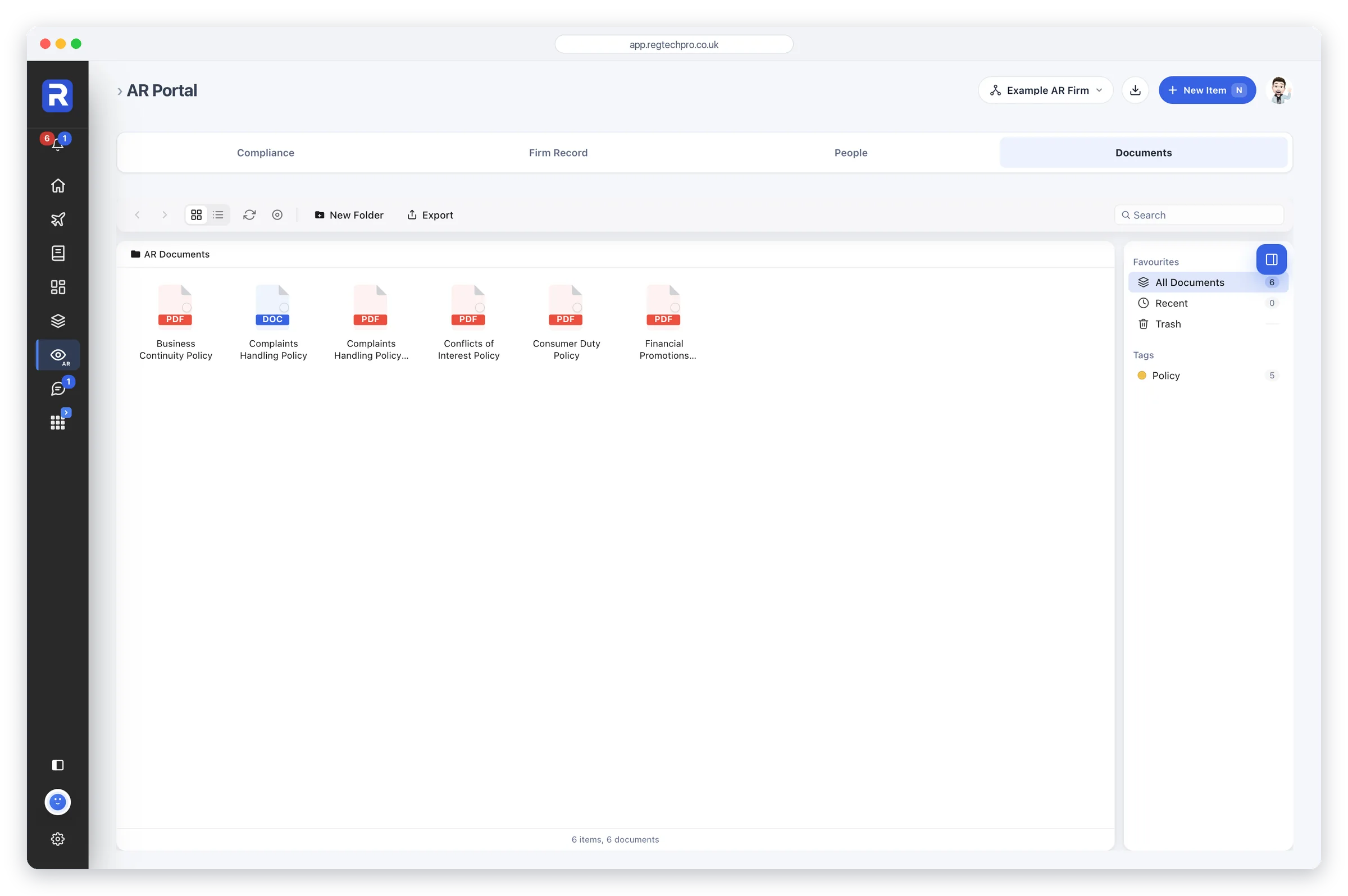
The User Portal: the appointed representative's confirmations and register entries in one table, with its four tabs

User Portal

The workspace a principal gives each appointed representative

The User Portal is where an appointed representative’s users do the compliance work their principal sets them, in four tabs: Compliance, Firm Record, People and Documents. The Compliance tab is one table of the confirmations the principal has scheduled for the AR, each one pending until it’s completed and sent to the principal for approval, and a repeating confirmation’s next round arrives when the last one is completed. The same table holds the register entries started in the portal. It’s a workspace of its own, not a window on the principal’s own records: the principal’s Monitoring Plan, its FCA returns and the confirmations it raises for itself are never in it, so the principal knows exactly what each AR can see.

Who it’s forPrincipal firms with appointed representatives or tied agents, and each one’s own users. The principal gives it to each of those users by name, alongside SUP 12 — AR Oversight. For a tied agent it is called the User Portal.
What it does

  • Compliance tab: every confirmation the principal has scheduled, with its due date
  • A repeating confirmation’s next round arrives when the last one is completed
  • Each confirmation is sent to the principal for approval
  • The same table: the register entries started in the portal
  • The forms each AR user can open are set person by person
  • No monitoring plan, no FCA returns and no form builder for the AR

What it produces

  • Completed AR confirmations, approved by the principal
  • Register entries the principal sees in its own Core Registers
Regulatory coverage
SUP 12.4SUP 12.6ASUP 12.7
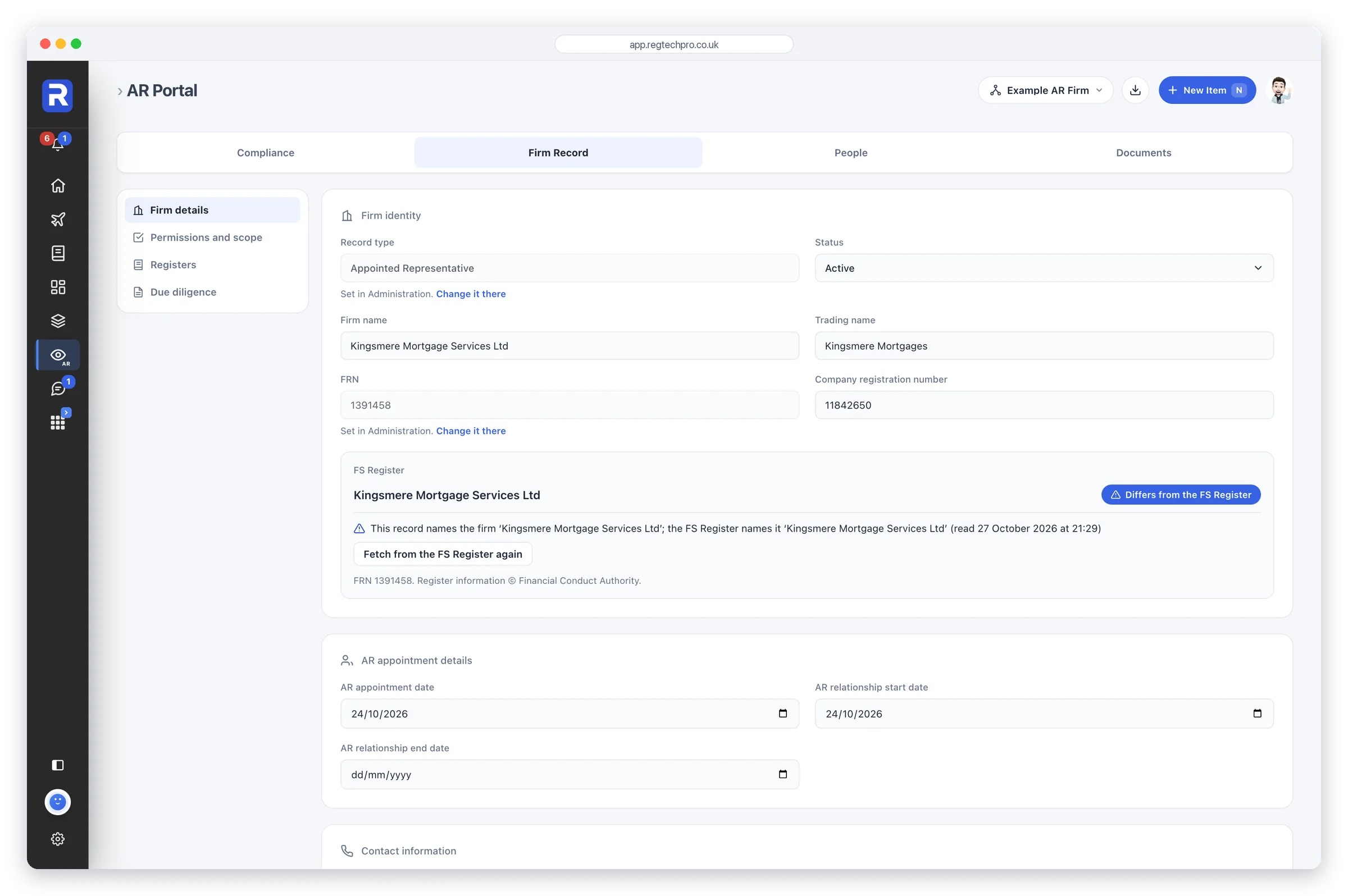
The User Portal's Firm Record tab: the firm's identity, its appointment details and its contact information

AR Firm Record

The appointed representative’s own file: details, permissions, registers and due diligence

The User Portal’s Firm Record tab is the file an appointed representative keeps on itself. It has four sections: Firm details, with the AR’s appointment dates; Permissions and scope; Registers of its officers, controllers, permission changes and group structure; and Due diligence. It’s the same record its principal reads in Firm Record and SUP 12 — AR Oversight, so what the AR enters is what the principal reviews, and nothing is copied between the two. The principal’s monitoring checks and its own firm confirmation stay with the principal.

Who it’s forAppointed representatives keeping their own firm file, and the principal firm that reviews it.
What it does

  • Firm details: names, FRN, company number, addresses, contact and what the firm does
  • The AR’s appointment date and the dates the relationship starts and ends
  • Permissions and scope: each regulated activity, customer type, limitation and effective date
  • Registers: officers and PSCs, controllers and close links, permission changes, group structure
  • Due diligence documents, each with its review date
  • One record shared with the principal, never a copy

What it produces

  • The AR’s firm file, kept current by the AR and reviewed by the principal
  • Due diligence documents with their review dates
Regulatory coverage
SUP 12.4SUP 12.6AFCA RegisterCompanies House
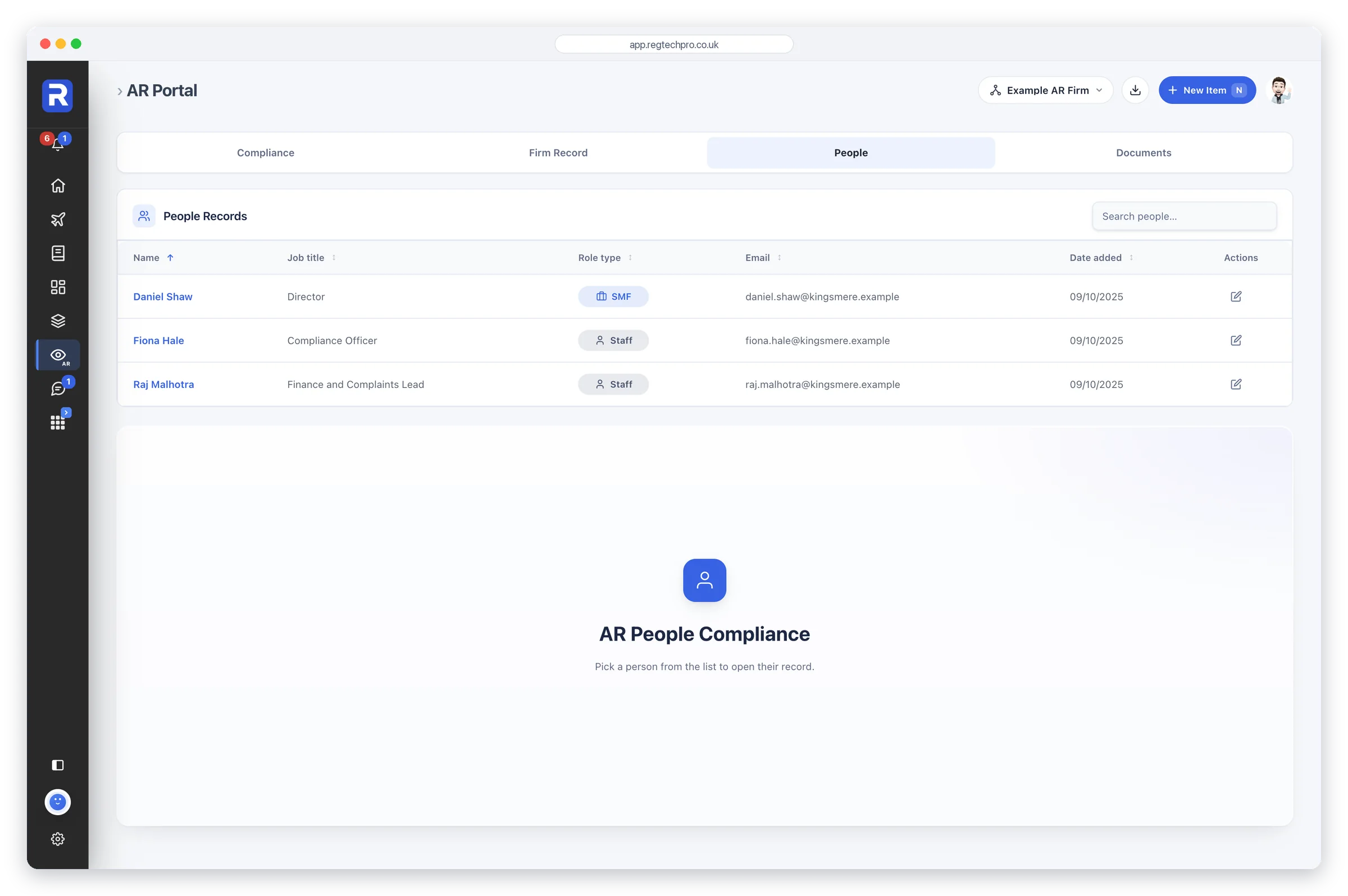
The User Portal's People tab: the appointed representative's people, with their job title, role type and email

AR People Compliance

Each AR user’s own people record, and the dates that come due

The User Portal’s People tab holds the people records of an appointed representative. An AR user opens it to their own record and no other, while the principal’s administrators and approvers see every person on the AR’s workflow. A fit and proper assessment, a certificate and a due diligence document each remind the person as the date approaches. A person here is an approved person, an IDD staff member or another staff member, and is added by the principal in People Compliance, so the principal decides who is on the AR’s books.

Who it’s forThe people working at an appointed representative, and the principal’s administrators and approvers who oversee them.
What it does

  • An AR user sees and keeps their own record, and no other
  • Administrators and approvers see every person on the workflow
  • Reminders as a fit and proper assessment comes due
  • Reminders as a certificate or a due diligence document comes due
  • Three kinds of person: approved person, IDD staff member, other staff member
  • People are added by the principal, in People Compliance

What it produces

  • Each person’s record, kept up to date by the person
  • Fit and proper, certificate and due diligence dates the principal can see
Regulatory coverage
SUP 12FITAPERIDD
The User Portal's Documents tab: the policies the principal firm has shared with the appointed representative

AR Document Library

The documents a principal shares with its AR, and the ones the AR sends back

The User Portal’s Documents tab is the one library an appointed representative’s users see. It holds what the principal has deliberately copied across, and what the AR uploads itself. A shared copy is a snapshot of the document as it was that day: changing the original later doesn’t change the AR’s copy, so the principal always knows which version each AR was given. The rest of the principal’s Document Library is never shown, and what the AR uploads appears on the principal’s own AR Library tab.

Who it’s forAppointed representatives receiving documents from their principal, and principals sharing a defined set with each AR.
What it does

  • Holds only what the principal has copied across, and the AR’s own uploads
  • Copy a document or folder to one AR or to all of them
  • A shared copy is a snapshot of the document as it was that day
  • The AR is reminded when a document is shared
  • Notify principal tells the principal about the AR’s new uploads
  • Folders, upload and export

What it produces

  • A record of what each AR was given, and when
  • The AR’s own uploads, on the principal’s AR Library tab
Regulatory coverage
SUP 12SYSC 9
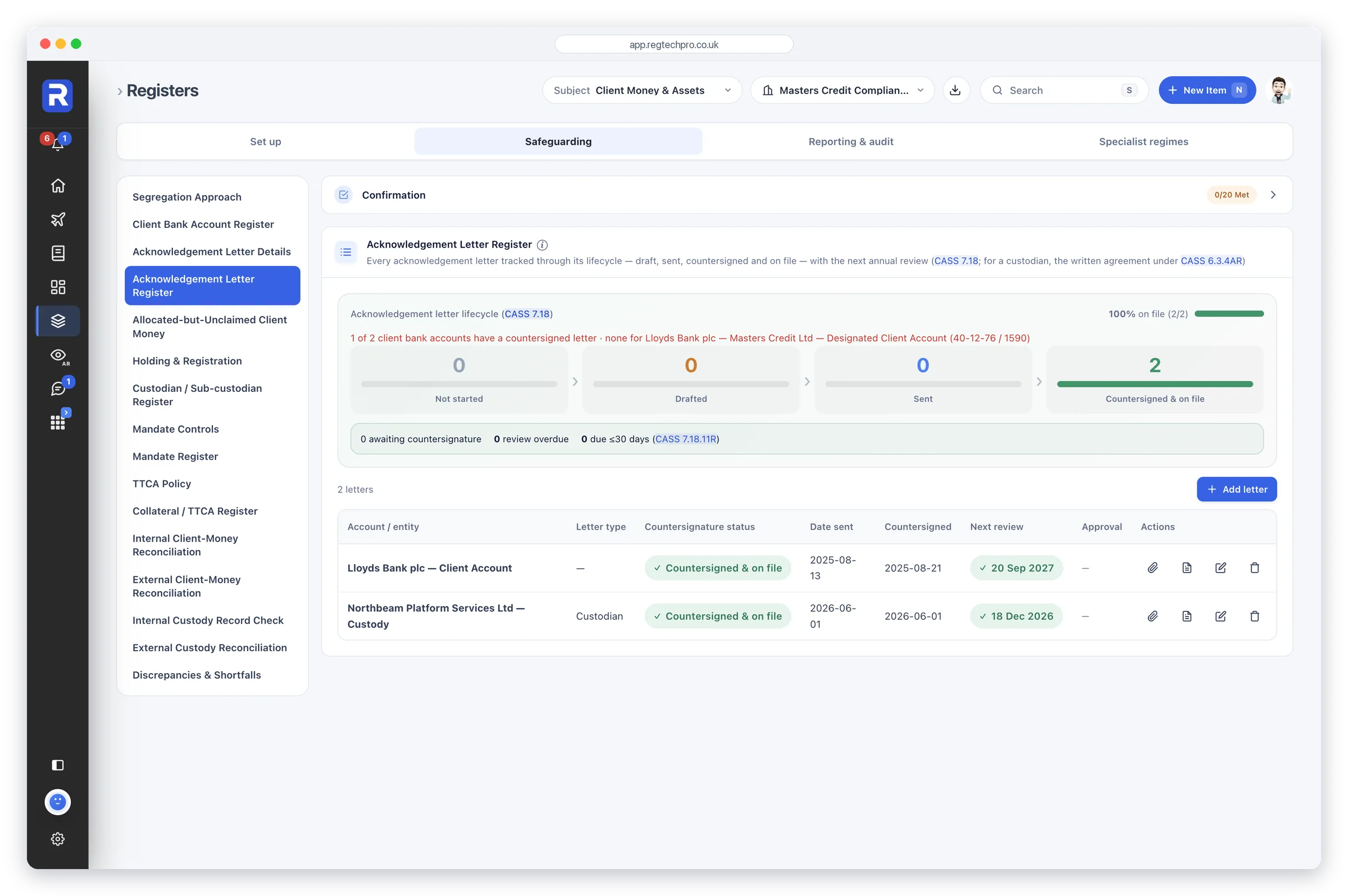
The CASS Client Money and Assets app: the acknowledgement letter register with each letter tracked from draft to countersigned and on file, and registers for client money, custody assets, collateral and mandates

CASS — Client Money & Assets

The FCA Client Assets sourcebook as an operating system

Turns the FCA Client Assets sourcebook into structured registers, calculators, reconciliation logs and evidence, covering the 14 CASS chapters (1A–15) plus SUP 3.10 audit prep. A CASS 1 applicability assessment suggests the chapters that bind your firm by type, for an administrator to switch on, and a Client Money Health score counts every register entry, confirmation and monitoring check. It replaces CASS spreadsheets, much of a CASS-consultant retainer and the bulk of annual CASS-audit preparation.

Who it’s forFCA-regulated firms that hold or control client money or safe custody assets, and the CASS oversight officer (CASS 1A.3) accountable for them.
What it does

  • CASS 1 applicability assessment suggests your chapters
  • CASS 1A calculator sizes firm and CMAR obligation
  • Client-money calculation showing any shortfall or excess
  • Client money and custody reconciliation logs
  • Acknowledgement-letter generator plus countersignature tracker
  • 48-hour CASS 10 resolution pack builder
  • Client Money Health score, RAG-rated

What it produces

  • CASS Annual Report to the governing body
  • FCA Readiness report: a mock FCA interview, RAG-graded
  • CASS 10 resolution-pack master document (48-hour index)
  • CASS Board Pack (CASS 1A.3)
  • CMAR data return
Regulatory coverage
CASS 1ACASS 6CASS 7 / 7ACASS 5CASS 10CASS 15SUP 3.10SUP 16.14
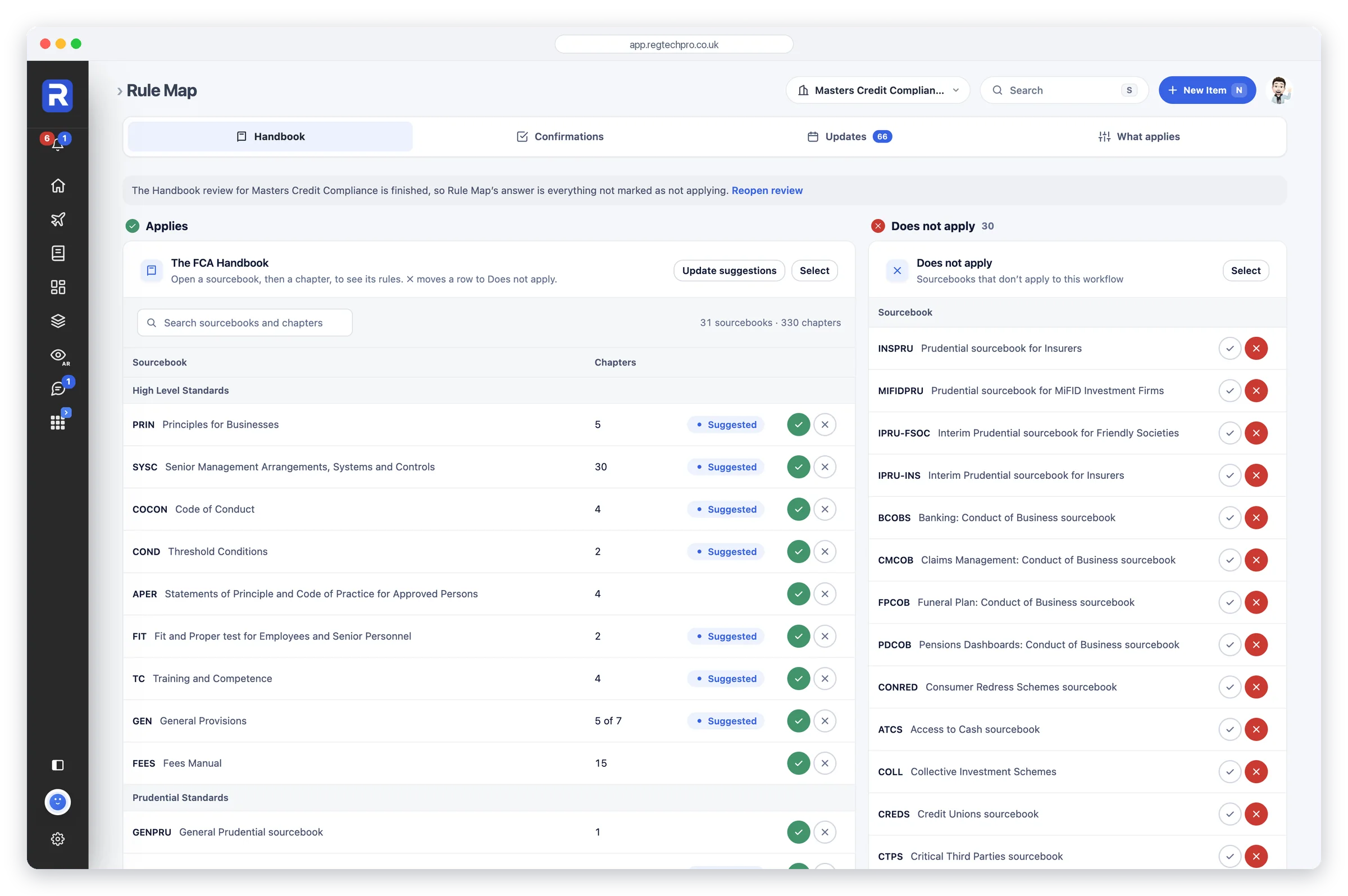
Rule Map: the FCA Handbook sourcebooks that apply to the workflow, with suggested chapters and a tick or cross for each

Rule Map

Your permissions become your rulebook

Rule Map reads the FCA Handbook for you. Start with your FRN and it suggests the Handbook chapters your permissions bring; you confirm what applies and set aside what does not, sourcebook by sourcebook, chapter by chapter, rule by rule. Every section that applies carries its own confirmation, with an answer, a comment and documents, so the firm confirms to the rules themselves rather than a summary of them. Your chapters are checked against the Handbook every day: a change shows its wording before and after, the day it takes effect and the checks on your monitoring plan that cite it, and you’re reminded before it lands. Otto is on hand to explain any rule, quoting its current wording.

Who it’s forCompliance Officers and SMF16 holders who need to know exactly which rules bind the firm and show that it meets them, and firms preparing for authorisation.
What it does

  • Suggests the Handbook chapters your permissions bring
  • Applies or doesn’t apply, on every sourcebook, chapter and rule
  • A confirmation for every section that applies, with a comment and documents
  • Your chapters checked against the Handbook every day
  • Rule changes shown before and after, dated to the day, with the checks they touch
  • Reminders when a change is announced, 30 days before it lands and on the day
  • Create a task, talk it through in Messages or mark it reviewed

What it produces

  • The firm’s own rulebook: every sourcebook, chapter and rule that applies
  • Section-by-section confirmations, with who confirmed and when
  • A dated record of every rule change and how it was dealt with
Regulatory coverage
FCA HandbookPRINSYSC
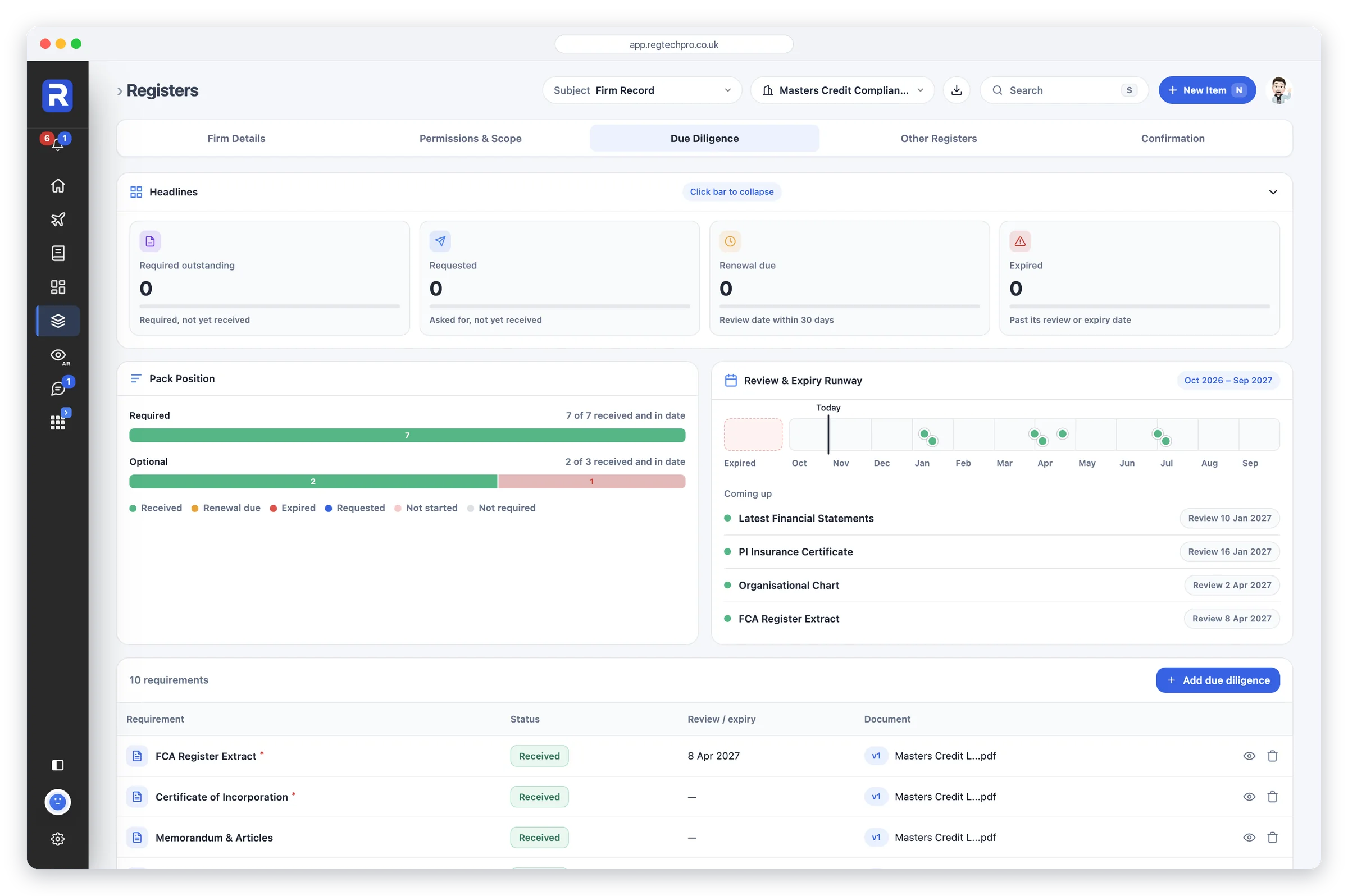
Firm Record: the firm's due diligence pack, with headlines, the review and expiry runway and each document's status

Firm Record

Your firm’s identity, permissions and due diligence, on file

One record per firm, holding the things every principal, auditor and regulator asks for about the firm itself: registered and trading name, FRN and company number, contact details and addresses, and a description of what the firm actually does. Beside it sit the two things almost no firm has written down — every regulated activity with its customer type, limitation and effective date, and a due-diligence file that versions each document and derives its own status from the review date.

Who it’s forEvery firm on the platform. Directly authorised firms keep one record; principals keep one per appointed representative; consultancies keep one per client firm.
What it does

  • Four record types — Firm, Appointed Representative, Tied Agent, User Group
  • Eight lifecycle statuses, from Prospect through to Terminated
  • FRN, company number, addresses and contact, filled in from the FCA Register
  • Permissions register: activity, customer type, limitation, effective from
  • Ten-point due-diligence checklist you can rename, extend or clear
  • Version history on every document — v1, v2, v3, never overwritten
  • Status derived from the review date: Expired, Renewal due, Received
  • Shared with AR Oversight — the same permissions and DD, not a copy

What it produces

  • A complete firm file per workflow, ready to hand to a principal or auditor
  • A permissions and scope register that states what the firm may actually do
  • A dated due-diligence position, with what expires next
  • The business description Otto reads for its policy gap analysis
Regulatory coverage
FSMA Part 4ASUP 12SYSCDISPMLR 2017FCA RegisterCompanies House
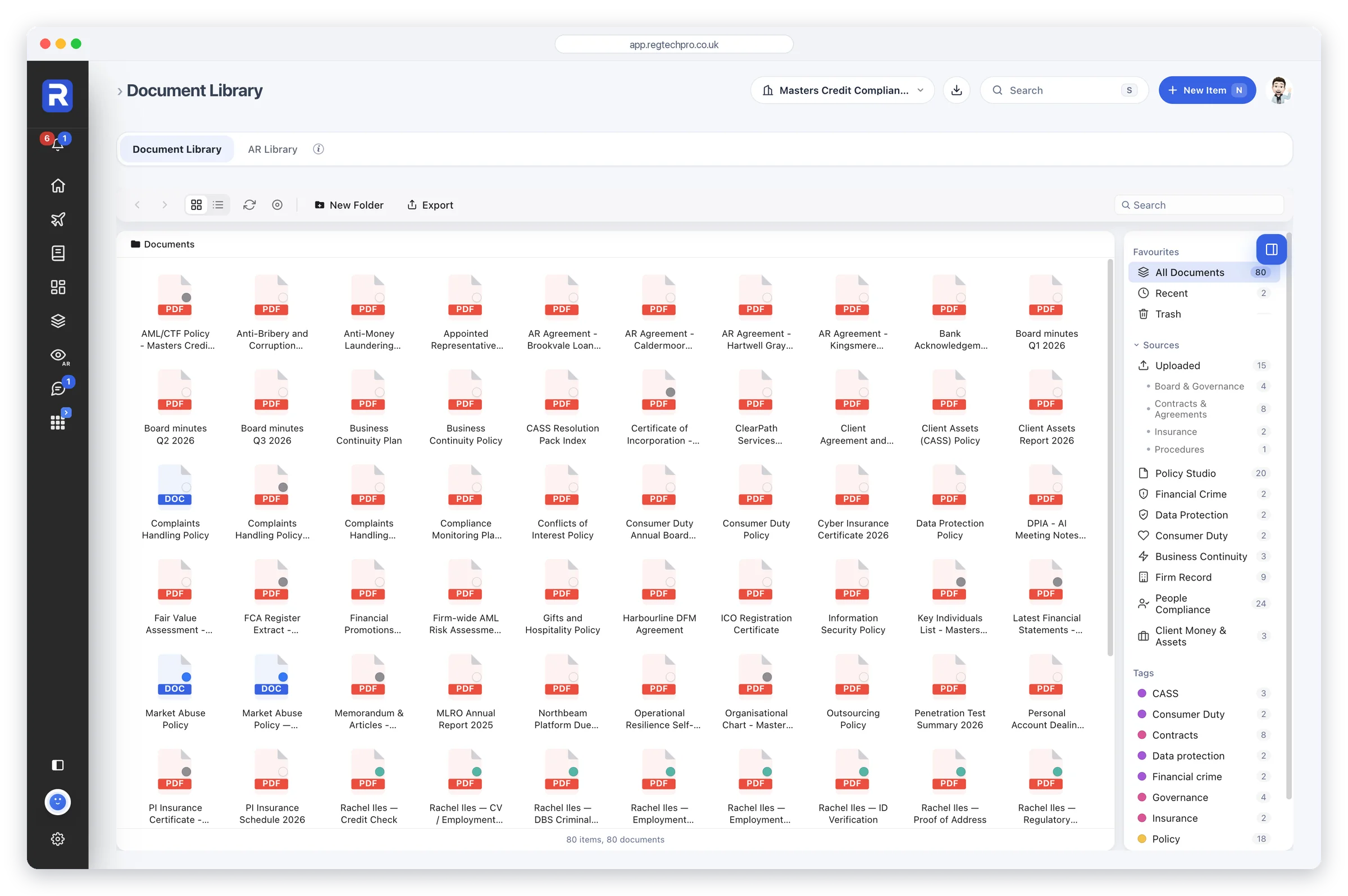
The Document Library: folders and files for the workflow, with every document grouped by the app it came from, recent items and an AR Library tab

Document Library

Every document the firm holds, filed as the work happens

A file browser for the firm’s evidence — folders, icon and list views, search, tags and export — with one difference that matters: it fills itself. When an app records a document, a copy is filed here under the name of the app that produced it, so the library completes itself as the work happens. Documents are held centrally, and policies written in Policy Studio open in the full Google Docs editor, with the revision history an auditor will ask for and no Google subscription of your own to buy. A second tab holds the AR Library: only what a principal has deliberately shared with an appointed representative, plus that representative’s own uploads.

Who it’s forEvery firm on the platform. Principals get the second library for sharing a defined document set with each appointed representative, without opening up the rest of the file.
What it does

  • Finder-style browser — folders, icon and list views, back and forward
  • Evidence from across the platform files itself here, grouped by source app
  • Colour-tagged folders, free-text tags and a favourites rail by source
  • Search by name; sort by name, date modified or kind
  • Policy Studio documents open in the full Google Docs editor
  • A separate AR Library holding only what the principal has shared
  • Scoped to the workflow you have selected — nothing crosses between workflows

What it produces

  • One place to answer “show me the records”, in the meeting
  • An evidence trail that builds itself as the firm does the work
  • A defined, auditable document set for each appointed representative
  • An exportable document register for the file or the auditor
Regulatory coverage
SYSC 9SUP 12MLR 2017UK GDPRDISPCOBS
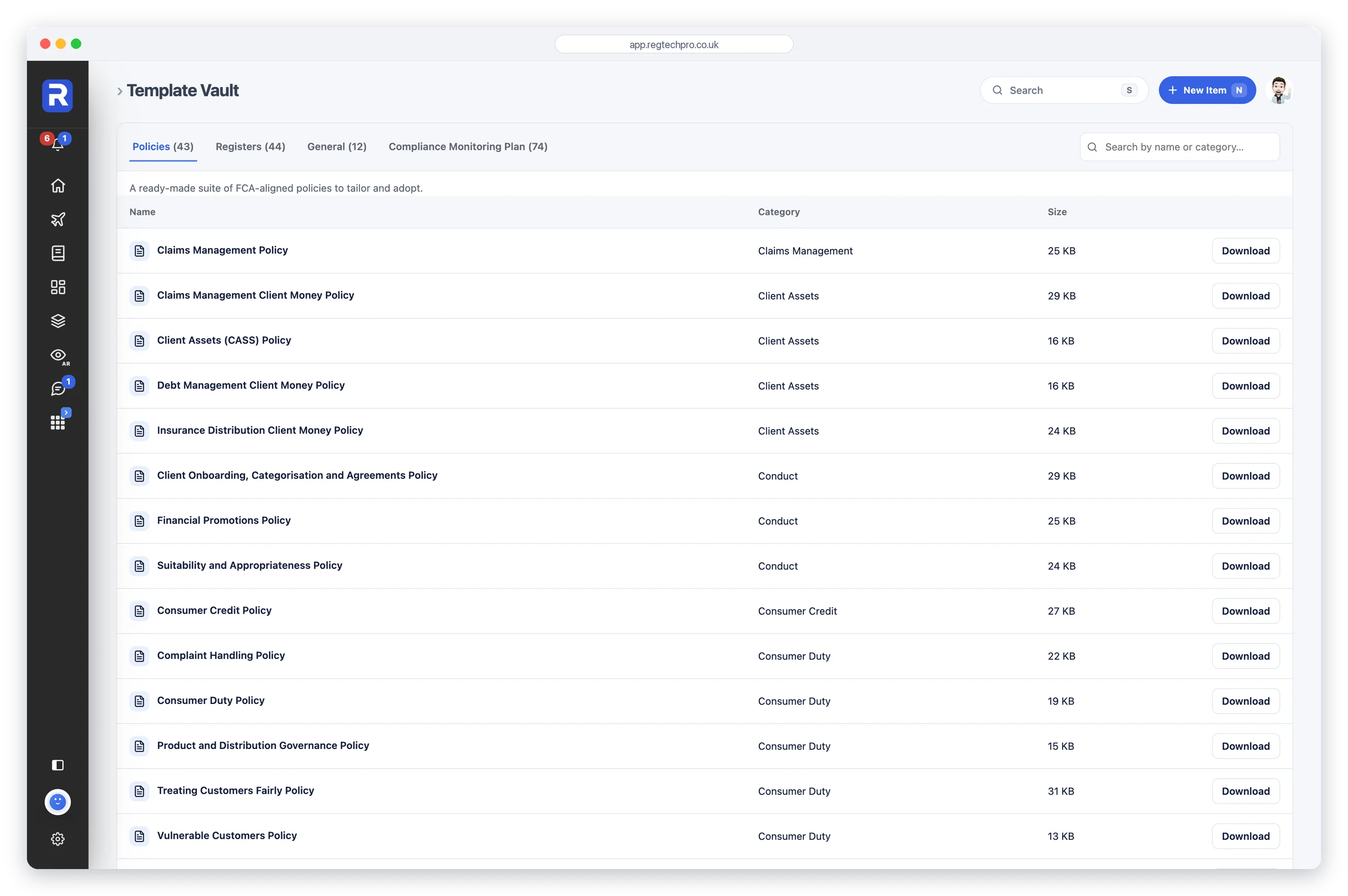
The Template Vault: ready-made policies listed by category, with tabs for registers, general documents and compliance monitoring plans, each ready to download

Template Vault

173 ready-to-tailor policies, registers and monitoring-plan chapters

A library of 173 editable Word documents written in-house: 43 FCA-aligned policies across 23 categories, 44 registers designed against the obligation they evidence, 12 standalone forms and notices, and a complete 73-chapter Compliance Monitoring Plan grouped into five parts. Search by name or category, download in one click, tailor it to your firm. No blank page, no per-document consultant fee, no watermarked PDFs.

Who it’s forFirms building or refreshing a compliance framework, firms preparing for authorisation, and consultancies that would otherwise draft the same policy suite for every client.
What it does

  • 43 FCA-aligned policies across 23 regulatory categories
  • 44 register templates across 16 categories
  • 73-chapter Compliance Monitoring Plan, Parts A to E, plus a master
  • 12 standalone forms and notices — privacy notices, DPA, DPIA and more
  • Permission-specific cover: CASS, funeral plans, cryptoassets, crowdfunding
  • Search by document name or category across every tab
  • Editable .docx throughout — never a locked PDF
  • Unmetered: no per-document, per-user or per-client download charge

What it produces

  • A tailored policy suite, adopted into your Document Library as evidence
  • Registers that already carry the columns the rule expects
  • A written Compliance Monitoring Plan scoped to your permissions
  • Board-ready forms: MLRO annual report, Statement of Responsibilities
Regulatory coverage
PRIN 2AMLR 2017UK GDPRCASSSM&CRDISPCOBSICOBSSYSCMAR
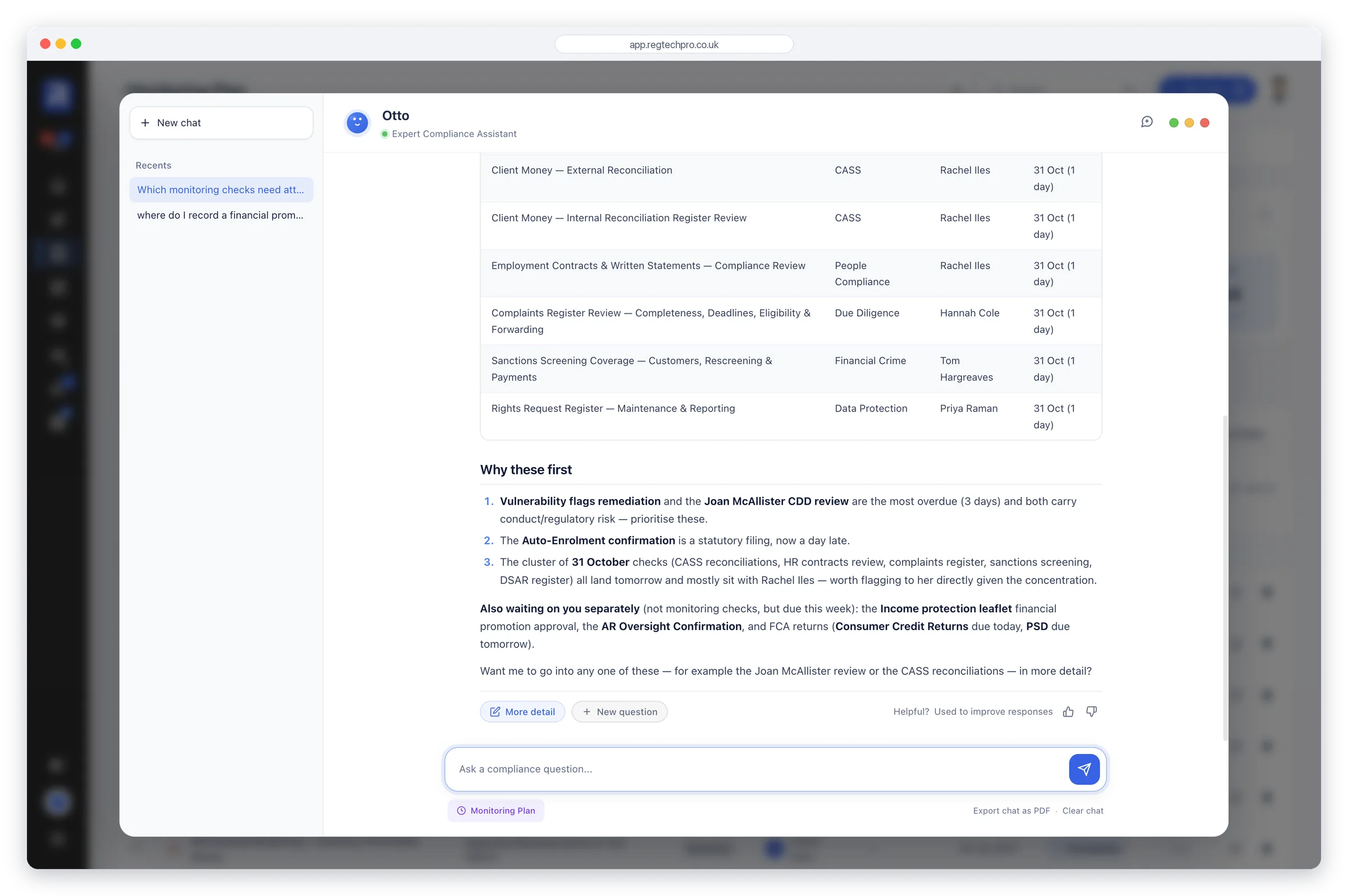
Otto, the compliance assistant, answering from the firm's live monitoring checks and explaining what to do first

Otto AI

Your compliance analyst, on every page

Otto is the platform’s built-in compliance analyst, and the answer is always drawn from your own records rather than a general summary of the Handbook. Ask what is overdue, where the file is thin or what a rule actually requires, and Otto reads the firm’s live tasks, registers, confirmations and findings to answer — naming the app it’s reading at the foot of the chat so you can check it. The same engine writes the commentary on every report in Reports: Compliance Monitoring, MLRO annual, DPO annual, Consumer Duty board, Risk Committee and an FCA Readiness mock interview. Otto drafts; a person decides. Nothing is filed, submitted or signed off automatically.

Who it’s forEvery user. Otto is included in the subscription and behaves the same in every app the firm holds.

What it does

  • Answers from your firm’s live records, not a generic handbook summary
  • Names the app it has read, so every answer can be checked
  • Says plainly when the data doesn’t support the question asked
  • Writes the commentary on the Compliance Monitoring Report
  • Reports — MLRO annual, DPO annual, board and committee papers
  • FCA Readiness: a mock FCA interview run against your own file
  • Filters the regulatory newsfeed to your permissions and products
  • Conversations are kept, and a chat exports to PDF

What it produces

  • Board-ready reports built from live data, with Otto’s commentary
  • A straight answer to “where do we actually stand?”, with the records behind it
  • Policies scored out of 10, with the fixes added on request
Regulatory coverage
SYSCPRIN 2AMLR 2017UK GDPRSM&CRSUP 12CASS
In every subscription

Connected to the Register. And to your team.

Two parts of the platform that work across everything above, both included.

FCA Register

FRN and IRN look-ups

Your FRN fills in your firm’s details and permissions from the Financial Services Register, and a person’s IRN brings in their roles.

  • Differences with the Register flagged
  • Disciplinary history on the fit and proper record
  • Six years of past firms, for references
Messages

Conversations on the record

Every ask, answer and attachment kept on the record and linked to the check or record it’s about.

  • Turn a message into a task
  • Approve or send back what is waiting on you
  • Only the people named on it can read it
See them in the tour →

Compliance software that comes with compliance people.

What makes us different
Otto AI

And Otto works across all of it.

Otto is the platform’s built-in compliance analyst — she reads your live data across every app, not a generic handbook summary.

Compliance Monitoring Report

A 12-section Compliance Monitoring Report built from the firm’s live monitoring data, with Otto’s commentary on each section.

App Report Suites

MLRO annual, DPO annual, Risk Committee and Consumer Duty board reports in Reports, each built from that app’s live records.

Ask Otto

The in-platform assistant answers from your own registers, with sources cited — which reviews are overdue, where the file is thin, what closes the gap.

Policies Drafted & Operationalised

Otto assesses and rewrites a policy, then turns its key commitments into tracked tasks.

AI drafts, humans decide — nothing is auto-submitted.

See how it works →
FAQs

Features and pricing. Questions answered.

The short answers before you open a feature — or a call.

What does the subscription include?
Every plan includes Reports, the Training Centre, Otto, the Flight Deck and Messages. Starter is the core set of apps; Pro adds Risk Management, Consumer Duty, Financial Crime, Customer Hub, Policy Studio and Data Protection; Network+, the complete platform, adds Business Continuity with Operational Resilience (SYSC 15A), SUP 12 AR Oversight with unlimited appointed representatives, the User Portal, Client Money & Assets, white-label branding and unlimited users. See pricing →
How much does it cost?
Three plans, all including VAT: Starter, Pro, and Network+, the complete platform, with 10% off paid annually. The Flight Deck, Messages and Otto AI come with every plan. The prices are on the pricing page, or start a 14-day free trial, with no card needed.
Do the features work standalone or together?
Each feature is complete in its own right, with its own registers, monitoring checks and dashboard. Reports draws them together, and the Flight Deck shows everything overdue or due across every feature — so firm-wide compliance posture lives on one screen.
Does the price go up as my firm grows?
No. Each plan is one monthly price: Starter for up to 10 users and 5 linked firms, tied agents or appointed representatives, Pro for up to 25 users and 10, and Network+ for unlimited users, firms and appointed representatives.
How fast is onboarding?
Under a day for most firms. A firm adds each feature’s monitoring checks in one step with its Add recommended checks button, or picks them from Templates. No migration project, no framework to design from scratch.
Network+ plan · White-label

Your firm’s brand.
Our compliance engine.

White-label branding comes with the Network+ plan. Add your logo, set your accent colour and sidebar palette, and the platform your team opens every morning looks like it was built in-house — because, as far as they’re concerned, it was.

  • Your logo mark, on every screen your people use
  • Your accent colour and sidebar palette, applied platform-wide
  • Set once by your admin, live for every workflow and every user
Your palette — or any hex you like

Start free, or talk to us first.

See how RegTechPRO can transform compliance across your firm — and prove it in just a few clicks.

14-day free trial, no card needed · Take the tour

Message Us

Thank you!

We've received your enquiry and will be in touch shortly.
